Quick answer
What Is a TFT LCD Display?
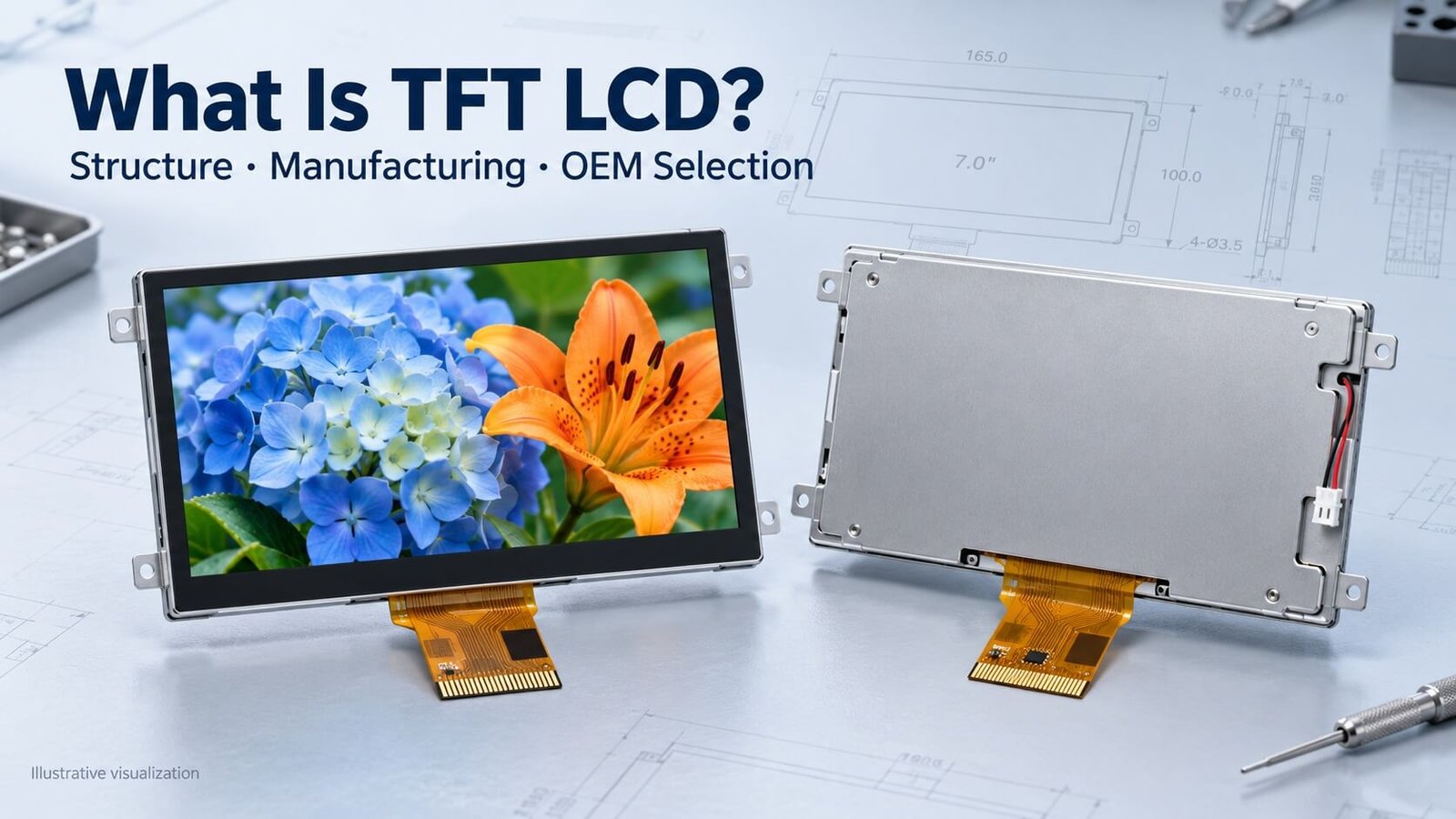
A TFT LCD is an active-matrix liquid-crystal display that uses thin-film transistors to control subpixel voltages. A conventional color module combines the image-forming panel with backlighting, drivers and electrical connections. IPS, TN and VA describe liquid-crystal modes; each can be used within a TFT LCD architecture.
For an OEM product, the panel alone is only part of the decision. Interface compatibility, backlight drive, mechanical fit, front optics and operating conditions determine whether the complete module works in the intended installation.
DisplayMan reviews these requirements together when selecting TFT LCD modules, high-brightness assemblies and transparent LCD display systems.
What Does TFT LCD Mean?
TFT LCD means thin-film-transistor liquid-crystal display. TFT describes the active-matrix switching architecture; LCD describes the light-modulating technology. The transistor array controls the electrical state of the subpixels, while the liquid crystal and optical layers determine how illumination reaches the viewer.
TFT is not another name for TN. A TFT LCD can use TN, IPS or VA liquid-crystal operation. These labels answer different questions: how a pixel is addressed, and how the liquid crystal behaves. For a focused viewing-angle comparison, see TN vs IPS vs VA. Display Visions also explains this distinction in its TFT/IPS introduction. [1]
A conventional color TFT LCD uses red, green and blue subpixels. Their transmission levels combine to produce the visible pixel color. “IPS” does not specify resolution, and “TFT” does not guarantee a particular brightness, temperature range or interface.
For the broader technology overview, see What Is an LCD Display?. This article concentrates on the TFT module, its manufacturing stages and the engineering decisions involved in placing it inside a product.
Panel, Module, Controller Board and Monitor
An RFQ saying only “TFT screen” leaves room for very different products. Confirm the supply boundary before comparing quotations.
| Item | Typical meaning | What the customer still needs to establish |
|---|---|---|
| LCD panel or cell | The image-forming panel; exact included parts vary by supplier | Driver connections, polarizers, illumination and handling requirements |
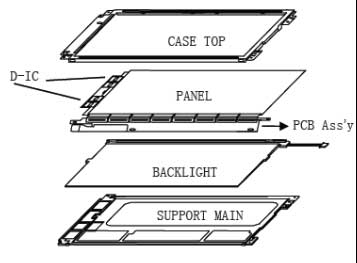
| TFT LCD module / LCM | Panel combined with supporting parts such as backlight, FPC and drivers | Exact interface, power rails and mechanical assembly |
| Controller-board kit | Module plus electronics that accept the specified source signal | Firmware, cables, backlight drive and power supply |
| Open-frame monitor | Display electronics and mounting structure, without a full decorative enclosure | Mounting, protective front, cooling and system installation |
| Complete monitor or terminal | Enclosed display system, potentially including touch or computing | Software, external connections and environmental qualification |
These are practical descriptions, not universal packaging standards. Ask for the actual bill of materials, drawing and interface specification. An LCD module does not necessarily accept HDMI, and a panel’s driver IC is not the same thing as an HDMI controller board.
How the TFT Array Controls an Image
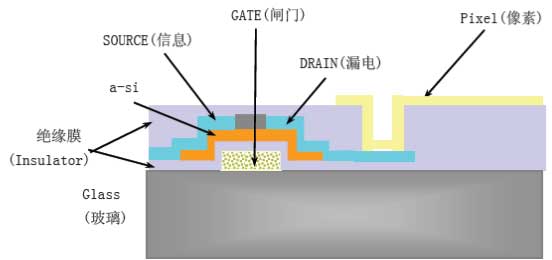
Gate drivers select rows of TFT switches. Source drivers apply image-related voltages through the data lines to the selected subpixels. Pixel capacitance, often assisted by a storage capacitor, helps retain the electrical state between addressing events.
The applied voltage changes the liquid crystal’s optical behavior. Together with the polarizers, this modulates transmitted light. For a conventional color LCD, the RGB filters and individual subpixel transmission levels produce the displayed color.
This active-matrix arrangement gives the driver more control over pixel state than a simple passive-matrix arrangement. It does not eliminate all coupling, leakage, response-time limits or image artifacts. Those depend on the panel design and operating conditions.
The original article described 256 gray levels and 16.7 million colors as a universal condition. In practice, native channel depth, dithering, frame-rate control and driver settings vary. Confirm the implementation and evaluate gradients using the real host system.
The Main Parts of a TFT LCD Module
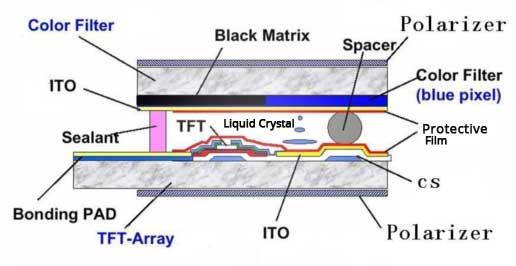
| Component | Function | Integration question |
|---|---|---|
| TFT array and pixel electrodes | Address and control subpixels | Which resolution, timing and addressing platform are available? |
| Liquid-crystal cell and color-filter structure | Modulate light and form color | Which mode and optical specification suit the viewing conditions? |
| Polarizers | Establish the required polarization behavior | Is the front surface suitable for the environment and viewing orientation? |
| Backlight assembly, where used | Supply illumination behind the panel | What current, voltage, dimming and thermal conditions are required? |
| Driver IC, FPC and connectors | Connect panel functions to supporting electronics | Are pinout, signal levels and power sequence compatible? |
| Frame and supporting structure | Support the panel and optical stack | Where can the assembly be supported without harmful pressure? |
| Optional touch and cover glass | Provide input and front protection | What changes in thickness, reflection, touch tuning and bonding? |
A defect can originate in the panel, interconnection, backlight, power supply or controller configuration. A bright spot is not automatically proof of a transistor-array defect; diagnose its behavior on different patterns and brightness settings.
How TFT LCDs Are Manufactured
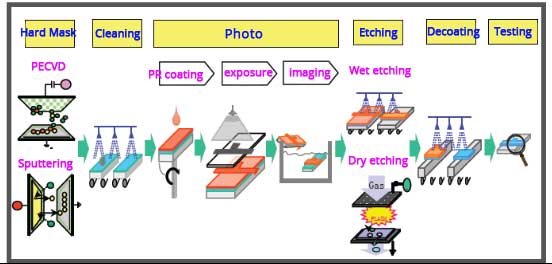
A useful overview separates array fabrication, color-filter fabrication, cell assembly and module assembly. BOE describes these production stages and the repeated patterning steps used to build a TFT array. [2]
Array and color-filter fabrication
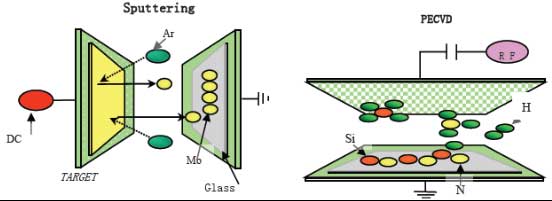
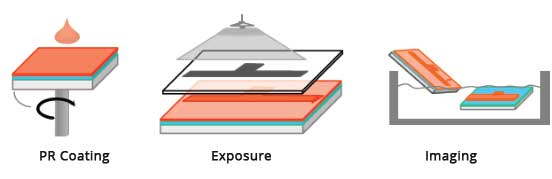
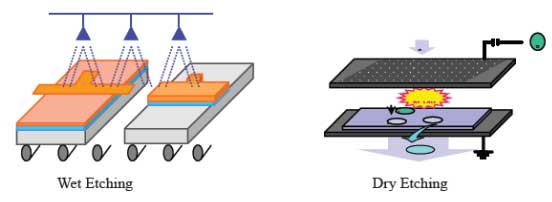
Thin films form the transistor switches, conductors, insulation and pixel electrodes on the substrate. Deposition, photoresist application, exposure, development, etching and resist removal are repeated as required. Inspection checks the patterned structures and electrical behavior.
The original article called film formation a “Hard Mark” process. A clearer description is thin-film deposition followed by patterned processing. Actual process sequences depend on the semiconductor technology and panel platform; one fixed six-step recipe does not describe every array.
The color-filter substrate provides patterned color regions and associated structures in a conventional color LCD. It must align with the pixel array. This is separate from adding colored illumination to a monochrome display.
Cell assembly
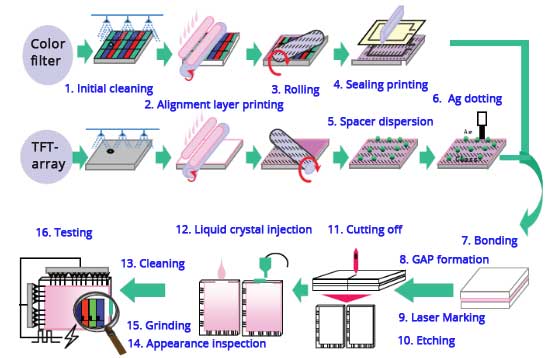
The substrates receive the relevant alignment treatment and are assembled with controlled spacing and sealing. Liquid crystal is introduced through an appropriate filling process. AUO identifies one-drop-fill technology among TFT LCD cell-process technologies. [3]
The cell gap, alignment method and sequence are design-specific. Do not specify the original article’s gap range or rubbing process as a requirement for every IPS, TN or VA panel.
Module assembly
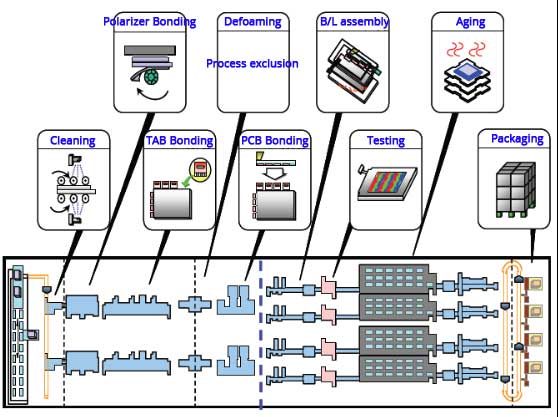
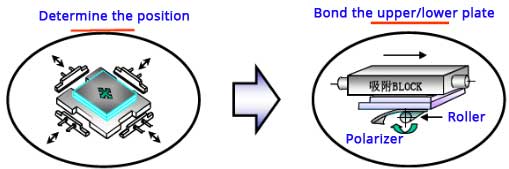
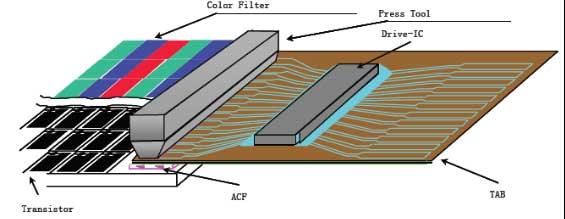
The finished cell is combined with the required polarizers, electrical interconnections, backlight and frame. Driver attachment and interconnection may involve structures such as COG, COF or other bonding arrangements, depending on the module. TAB should not be presented as the mandatory construction for every display.
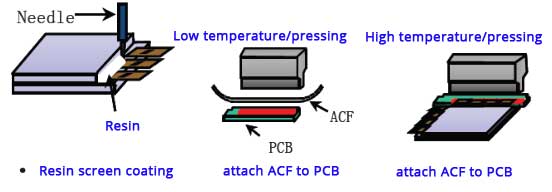
Anisotropic conductive film can provide electrical connections under controlled bonding conditions. It is a production process requiring matched materials and equipment, rather than a general repair instruction for an assembled screen.
Module inspection follows the agreed product requirements. Temperature, duration and operating patterns for burn-in or aging tests are defined for the project; 50°C is not a universal test setting.
Polarizer and interconnection examples
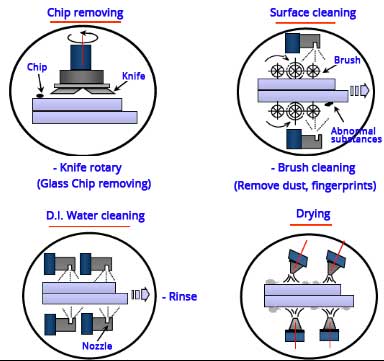
The following original illustrations expand the module-assembly stage. They show representative factory operations; they do not prescribe a universal sequence or finished-module servicing method.
Backlight Structure: Edge-Lit and Direct-Lit
A conventional transmissive TFT LCD requires illumination behind the panel. LED backlights commonly use regulated LED drivers; the old description of an LED lamp powered by a CCFL-style inverter mixes different technologies. TI’s backlight-driver information covers LED driving and dimming considerations. [4]
Edge-lit assemblies place LEDs beside a light-guide plate that distributes light across the display. Reflective and optical films help manage uniformity and direction. The final stack depends on the design; it does not always require the same two prism films or fixed brightness multipliers.
Direct-lit assemblies place LEDs behind the display area and use an appropriate mixing and optical structure. LED layout, mixing distance, thermal design and films affect uniformity and thickness. Direct-lit construction does not automatically mean local dimming.
| Decision | Edge-lit approach | Direct-lit approach |
|---|---|---|
| Light distribution | Relies on a designed light-guide structure | Relies on rear LED layout and optical mixing |
| Thickness | Can support thin module designs | Depends on the mixing distance and construction |
| Brightness changes | May require LED, optical and thermal redesign | Can involve LED layout and drive changes, subject to validation |
| Main validation | Uniformity, LED-edge behavior and thermal limits | Hotspots, uniformity, thermal paths and thickness |
Increasing LED current is not a complete high-brightness design strategy. Check rated current, temperature, driver capacity, light stability and expected lifetime. For a finished system, cover-glass reflection and sunlight loading also matter.
Interfaces and Controller Compatibility
The interface must match the module and host electrically and logically. The same connector count does not establish compatibility. Newhaven’s product documentation provides examples of parallel RGB, LVDS and MIPI DSI modules with their own timing and mechanical specifications. [5][6]
| Interface direction | Integration characteristic | Confirm before selection |
|---|---|---|
| MCU parallel / SPI, where supported | Command/data transfer to a suitable display controller | Controller memory, update performance and initialization |
| Parallel RGB | Pixel data with associated timing signals | Bus width, clock, sync/de timing and signal integrity |
| LVDS | Differential link used by suitable modules and hosts | Mapping, channel count, bit depth and timing |
| MIPI DSI | Serial display link with panel-specific configuration | Lane count, host mode, initialization and timing |
| HDMI or DisplayPort kit | External source input through a compatible controller board | Board firmware, output mapping, cables and power |
Touch communication is another interface. A display may use one link for image data and a separate connection for touch. Backlight enable and dimming may also need their own signals.
For a replacement project, provide the original part number, full datasheet, pinout and working sample where available. A module with the same diagonal and resolution can still require different host software or electronics.
TFT LCD Parameters That Affect Product Selection
Specify performance under usable test conditions rather than selecting the largest number in each column.
- Size and geometry: diagonal, aspect ratio, active area, viewing area, outline, thickness and cable exit are different dimensions.
- Resolution: match content and host capability. Pixel pitch follows active dimensions and pixel count; it is not one fixed TFT value.
- Brightness: use cd/m², also called nits. This is luminance, not lumens per square meter. Specify front-of-assembly brightness where touch or cover glass is included.
- Contrast: distinguish panel measurements in controlled conditions from readability under ambient light. Reflections can dominate the perceived black level.
- Viewing behavior: assess the actual angles, orientation and image content. IPS often offers advantages for off-axis use, but validate the selected module.
- Response and refresh: liquid-crystal transition time differs from frame refresh and total system latency. Measurement method and temperature matter.
- Color: check gamut, native depth, gradients and any calibration requirement rather than assuming every TFT is identical.
- Operating limits: distinguish operating temperature from storage temperature; review humidity, UV, vibration and thermal conditions where relevant.
There is no universal TFT “80 MHz bandwidth” or response-time threshold that proves suitability. Use the selected module’s pixel clock, timing limits and test definitions. A module accepting a particular frame rate does not guarantee every gray transition completes within that frame interval.
For broader parameter definitions, refer to the LCD fundamentals and selection guide.
Ordinary, High-Brightness and Transparent TFT LCD Directions
An ordinary backlit TFT module is often the starting point for an enclosed device interface. Select brightness from the viewing environment and front optics, not solely from the word “industrial.” A shaded indoor control panel and a sun-exposed outdoor terminal have different needs.
A high-brightness TFT LCD combines a suitable panel with an engineered illumination system. Review LED drive, thermal paths, reflection control, front-of-assembly luminance and the power budget. Higher brightness alone does not establish weather resistance or eliminate solar-heating issues. See High Brightness TFT LCD Displays.
A transparent LCD uses the image-forming panel in a see-through arrangement. It still needs an appropriate illumination environment; a transparent showcase and a conventional opaque backlight are different optical systems. Product lighting, background, content and cabinet depth must be considered together. See Transparent LCD Displays and the Transparent Display Cabinet Engineering guide.
Reflective and transflective LCDs are further optical directions, not exceptions that invalidate TFT addressing. Where ambient-light operation or low power is important, compare these options using the LCD technology overview.
What Can Be Customized Around a TFT Panel?
The most economical route often starts with an available panel. Module or system engineering can then address the application without requiring new TFT array fabrication.
| Scope | Examples to review | Constraint to establish |
|---|---|---|
| Module mechanics | FPC, connector location, supporting frame | Panel bonding limits, geometry, tooling and quantity |
| Optical assembly | Backlight, touch, cover glass or optical bonding | Uniformity, reflection, thickness and material compatibility |
| Electronics | Backlight driver or interface-controller board | Electrical requirements, firmware, thermal design and production quantity |
| Complete system | Open-frame monitor, enclosure and mounting | Installation, serviceability and environmental requirements |
| New panel development | Different active area or pixel architecture | Fabrication feasibility, investment, MOQ and qualification |
A custom cover outline does not change the TFT active area. Small TFT modules should not be assumed cuttable. Selected large-format bar-type projects can involve specialized cutting and reconstruction, but that requires a separate feasibility assessment.
DisplayMan can review standard TFT LCD display modules and feasible integration changes. Provide expected order quantity and annual volume early. Board development normally needs a production-volume business case; the MOQ and engineering charge depend on the project scope.
For legacy replacement, send the original assembly and electrical information where possible. Matching the existing host behavior may be more important than selecting a newer resolution or connector.
Sample Approval and Production Inspection
Agree on acceptance criteria before ordering production. The original statement that fewer than three bad pixels universally means “Class A” should not be used. Bright dots, dark dots, subpixel defects, clusters and inspection zones need an agreed definition.
Optical: inspect suitable solid colors and gray patterns, then representative application content. Specify viewing distance, lighting, brightness setting and allowed defects. Check uniformity, mura, leakage and visible contamination as applicable.
Electrical: confirm interface timing, initialization, power sequence, image orientation, backlight dimming and power consumption. Test startup, restart and relevant sleep/wake behavior using the intended host.
Mechanical: inspect outline, mounting clearances, FPC bend and connector orientation. Avoid pressure on the active region or unsupported glass edges. Repeat the check after integration with touch and cover glass.
Environmental: agree on operating and storage tests appropriate to the product. For high-brightness systems, evaluate temperatures inside the final enclosure, not only on an open bench.
Documentation: retain the approved drawing revision, sample configuration, driver or firmware settings and inspection criteria. Establish how component changes will be communicated. Lifetime figures require stated conditions and end-of-life criteria, rather than a generic claim for every TFT.
For handling precautions, use the ESD protection guide. ESD control does not replace mechanical protection or electrical compatibility checks.
LCD Appearance and Display-Defect Checklist
Inspect a suspected defect before assigning a cause. The same visible symptom can originate in the panel, optical stack, interconnection, controller, power supply or mechanical assembly. Separate cosmetic observations from functional failures, then record the conditions under which the symptom appears.
| Observation | What to distinguish | First inspection step |
|---|---|---|
| Spots, fibers or contamination | External dirt, material beneath the front layer, pixel defects and optical nonuniformity can look similar. | Inspect with the display off and with agreed solid-color patterns. Use only the approved surface-cleaning method; do not dismantle the stack to diagnose a mark. |
| Scratches, bubbles or surface discoloration | Removable shipping-film marks differ from damage to a polarizer, cover glass or bonded layer. | Identify the affected layer and inspect under defined lighting. Do not peel the polarizer or use unapproved solvents. |
| Broken glass, chipped edges or spreading dark regions | Physical cell damage may affect the image, electrodes or sealing. | Set the sample aside for supplier review, document packaging and handling, and avoid pressing the area or continuing assembly. |
| Uneven color, rainbow patterns or pressure marks | Optical variation can depend on the panel, layer stress, viewing angle or assembly load. | Compare a matching approved sample at the same settings and orientation. Check the mounting without forcing or flexing the glass. |
| Backlight leakage or bright edges | Panel behavior, light shielding and assembly stress can all affect the observation. | Use agreed brightness, ambient light and viewing distance; inspect the final assembly rather than relying only on an exaggerated camera image. |
| Lines, missing image areas or intermittent operation | Possible sources include signal configuration, cables, connectors, bonding or panel circuitry. | Check pinout, timing and power first. With power off, inspect accessible connections; use known-compatible reference electronics where available. |
| Unexpected power draw or an unstable image | Supply problems, incorrect configuration, electrical faults and normal content-dependent behavior require different diagnoses. | Compare with the module specification and approved operating state. Stop testing if limits are exceeded; do not raise voltage to conceal a fault. |
| Wrong revision or mixed materials | Matching appearance does not establish electrical, optical or mechanical interchangeability. | Check part numbers, drawing revisions, firmware and lot traceability before combining samples or accepting production. |
Agree on defect size, count, location, clusters and inspection conditions for the exact product. A missing temporary protective film is a packaging or handling issue if that film is required; it is not by itself proof that the display has failed. Keep bright-pixel defects, contamination, optical leakage and damaged glass as separate inspection categories. Manufacturer inspection criteria illustrate why observations and limits must be product-specific. [7]
TFT Image Faults and Monochrome Segment Faults Are Different
The older defect article also discussed missing segments and ghost segments in monochrome LCD glass. Those are not automatically TFT pixel faults. For a segment display, review electrode connections, contact pressure where specified, and the approved drive waveform, bias and multiplex configuration. Sustained DC across the liquid-crystal cell can damage it; do not apply a generic “increase the voltage” fix. [8] See Monochrome LCD Displays for that product direction.
For a supplier investigation, provide the part and revision, sample quantity, failure rate, photographs or video, test pattern, brightness setting, supply measurements, host configuration and whether the symptom was present before mounting. Preserve the failed sample and compare it with a matching approved sample.
For the dedicated optical issue, see LCD Backlight Bleeding. The checklist above supports initial inspection; a confirmed root cause requires testing of the actual assembly.
OEM Requirement Checklist
Send DisplayMan the following information so the module and integration scope can be reviewed together:
- Application, displayed content and expected service schedule.
- Preferred diagonal, active area, outline and available installation depth.
- Resolution and host processor or existing signal source.
- Interface specification, pinout and initialization information where available.
- Viewing distance, viewing directions and indoor or outdoor lighting.
- Brightness target, dimming requirement and power budget.
- Touch, cover glass, bonding and front-surface requirements.
- Operating/storage temperatures and relevant environmental exposure.
- Expected order quantity, annual volume and target schedule.
- Mechanical drawings and an original sample for replacement projects.
For an early concept, identify the non-negotiable requirements first. An available panel close to the intended design may be more practical than custom panel development. Confirm this before finalizing the enclosure or committing the host electronics.
Frequently Asked Questions
Is IPS better than TFT?
IPS is a liquid-crystal mode, while TFT is an addressing architecture. A display can be both IPS and TFT. Compare IPS with TN or VA for viewing behavior, then review the actual module specification.
Does every TFT LCD need an LED backlight?
Conventional transmissive modules need illumination behind the panel. Reflective and transflective structures handle light differently. A transparent LCD requires a deliberately designed lighting environment rather than assuming a normal opaque backlight assembly.
Can I connect a TFT module directly to HDMI?
Only if the supplied assembly includes a compatible HDMI input path. A raw RGB, LVDS or MIPI DSI module usually needs suitable host electronics or a correctly configured controller board.
Is 1000 nits necessary for every industrial display?
No. Required brightness depends on ambient light, reflections, viewing conditions and power constraints. Validate readability in the intended installation.
Can a same-size TFT replace my existing screen?
Not automatically. Check dimensions, interface, pinout, timing, power rails, initialization, backlight wiring and mounting. A visually similar module can be electrically incompatible.
Does an LED-backlit TFT count as an LED display?
It remains an LCD: liquid crystals modulate the image light. A direct-view LED display forms the visible image with light-emitting pixels. The use of LEDs as an LCD backlight does not make the two display structures equivalent.
From guide to product
Explore Related Display Products
Choose the product direction that matches the content and viewing environment.

TFT LCD Displays
Explore color modules for OEM interfaces, with mechanical, electrical and optical requirements reviewed together.
Explore product options →
High Brightness TFT LCDs
Compare brighter module options while checking reflection control, power and thermal constraints.
Explore product options →
Transparent LCD Displays
Review see-through display directions for showcases, refrigeration and other engineered systems.
Explore product options →Project review
Find the Right TFT LCD Module for Your Product
Send your application, dimensions, interface, viewing conditions, quantity and drawings. DisplayMan can review standard TFT modules, feasible customization and the electronics or assembly needed for your product.
Prefer to open the enquiry form here?
Technical References and Further Reading
- Display Visions: TFT and IPS terminology
- BOE: Panel production process overview — array, color film, cell and module
- AUO: TFT LCD array, cell, color-filter and driving technologies
- Texas Instruments: LED backlight drivers and dimming
- Newhaven Display: Parallel RGB TFT module specification example
- Newhaven Display: MIPI DSI TFT module specification example
- Newhaven Display: Product-specific inspection and acceptance criteria example
- Texas Instruments: Segment LCD drive waveforms and DC-bias precautions
These references explain technology and provide product examples. OEM requirements and acceptance criteria must be agreed for the exact module; example specifications are not universal TFT LCD ratings.