1. Photoelectric characteristics
1.1 Basic instructions
|
| Item | Description |
| 1 | display mode | BTN / negative / transmissive / 12:00 clock |
| 2 | driving condition | DUTY: 1/4 BIAS: 1/3 Vop: 5.0V |
1.2 Maximum ratings
|
| Item | Rating | Unit | Condition |
| 1 | the voltage of alternative current | 15 | V | Less than 1 hour |
| 2 | the voltage of direct current | 10 | V | Less than 100 hours |
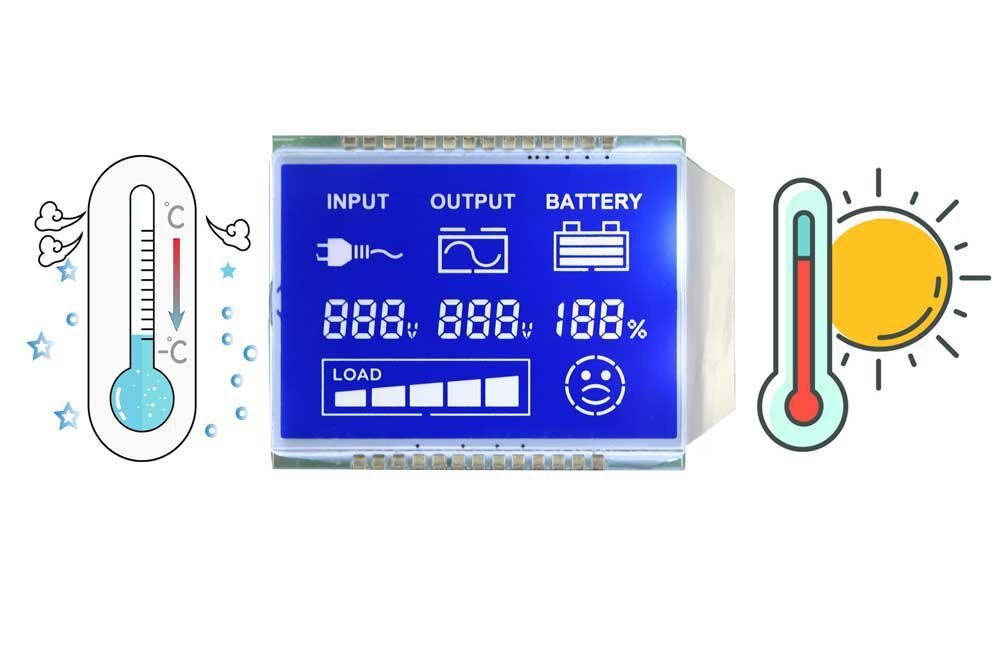
| 3 | working temperature | -20~70 | ℃ | |
| 4 | stock temperature | -30~80 | ℃ |
1.3 Photoelectric characteristics
| Parameter | Symbol | Testing | Min | Type | Max | Unit | Remarks | |||
| Condition | Temperature (℃) | |||||||||
| 1 | Recommendation voltage | VLCD | θ=10 φ=0 | 25 | 4.8 | 5.0 | 5.2 | V | remark1 remark2 | |
| 2 | Working voltage | V10 (Vth) | θ=10 φ=0 | 0 | — | — | — | |||
| 25 | — | — | — | |||||||
| — | ||||||||||
| V90 (Vsat) | θ=10 φ=0 | 0 | — | — | — | |||||
| 25 | — | 5.0 | 5.2 | |||||||
| 50 | — | — | — | |||||||
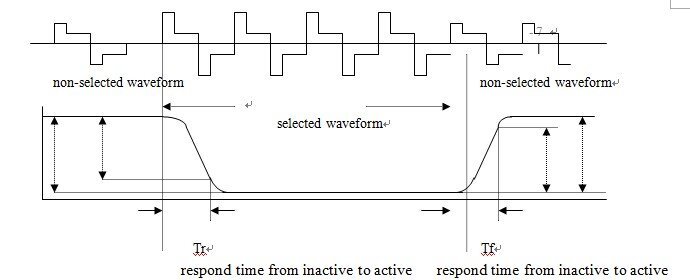
| 3 | Responding time | from inactive to active | Tr | θ=10 φ=0 | 0 | — | — | Ms | remark1 remark4 | |
| 25 | — | 90 | 150 | |||||||
| 50 | — | — | — | |||||||
| from active to inactive | Tf | θ=10 φ=0 | 0 | — | — | — | ||||
| 25 | — | 100 | 250 | |||||||
| 50 | — | — | — | |||||||
| 4 | View angle (Cr≥2 ) | θ(6H) | φ=00 | 25 | 25 | 105 | — | Deg | remark1 | |
| φ(3H) | θ=0~450 | 25 | 10 | 50 | — | |||||
| φ(9H) | θ=0~450 | 25 | 10 | 50 | — | |||||
| 5 | Current dissipation | ILCD (MIX) | 25 | — | 4.84 | 7.26 | uA | remark3 | ||
| 6 | Capacitance | C | 25 | — | 1.8 | — | nF | remark6 | ||
| 7 | Contrast ratio | Cr | θ=10 φ=0 | 25 | 100 | 500 | — | remark5 | ||
2. The reliable testing of LCD panel
| Parameter | Condition | Working voltage | Testing time | ||||
| 1 | High temperature | 70℃ | Vop=5.0V | 192 hours | |||
| 2 | Low temperature | -20℃ | Vop=5.0V | 192 hours | |||
| 3 | High temperature | 80℃ | NO | 192 hours | |||
| 4 | Low temperature | -30℃ | NO | 192 hours | |||
| 5 | High temperature and high moisture | 40℃, 90% moisture | NO | 192 hours | |||
| 6 | High and low-temperature circle test | -20℃ | +25℃ | +70℃ | +25℃ | NO | 10 circles |
| 30 min | 20 min | 30 min | 20 min | ||||
3. Using instruction
3.1 Safety instruction
Liquid crystal is not allowed to be contacted, if you accidentally touch the liquid crystal, please rinse with water immediately.
3.2 Pressure instruction:
LCD panel is an advanced glass product that has precise and specific orientation processing. If the panel is under tremendous pressure, the orientation of the panel may be disturbed and it is very difficult to return to the original state. If it is dropped on a floor or hit on a hard object, it is very easy to be cracked or broken.
Please note: it is necessary to avoid accident shock for LCD products.
3.3 Installation instructions:
a. The connection type of LCD panel can be conductive rubber strip, zebra and PIN which can be welded.
b. When glass LCD panel is installed in the enclosure, you must be careful and not put excess pressure on the glass with your fingers. Otherwise, it may shorten the using time of LCD screen because of the mistaken operation.
c. When the AC driving voltage is greater than the predetermined voltage, it will shorten the using time of LCD screen.
d. You should be careful when you touch the polarizer film because it is very tender and susceptible to be damage. You should remove the protective film which protects the polarizer film before you install the LCD panel.
e. Please clean the polarizer film with a dry, soft and lint-free cloth and a small amount of petroleum ether. Please do not use organic solvents.
f. Clean the zebra, PIN and conductive rubber strip with alcohol before you install it.
g. LCD screen is a photosensitive produt which is driven by electricity and should not be short-circuited.
3.4 Storage instructions:
a. It should avoid being stored in a hot and humid conditions. If it is going to be stored for a long time, it should be stored at a temperature between 15 ℃ to 35 ℃ and humidity less than 65%.
b. LCD should be stored in a dark place and should not be placed in the condition exposed under the sunlight or the light,
c. Please note: water or sweat may damage or erode the polarizer film and electrode of LCD screen.
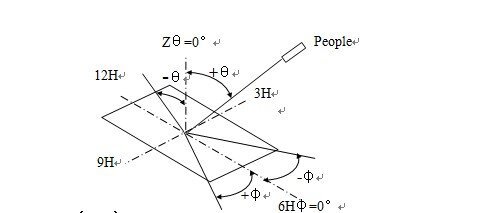
Remark 1: viewing angle
Remark 2: threshold voltage(Vth)and saturation voltage (Vsat)
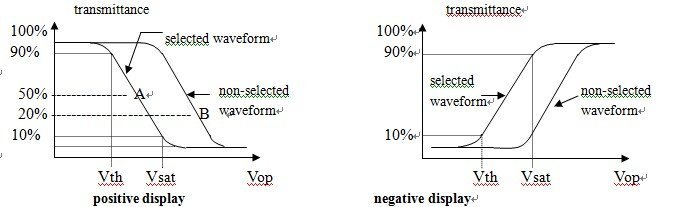
Vth:
Positive: the voltage is that font transmittance is 90%
Negative: the voltage is that font transmittance is 10% (relative to non-selected waveform)
Vsat:
Positive: the voltage is that font transmittance is 10%
Negative: the voltage is that font transmittance is 90% (relative to non-selected waveform)
Conditions:
(1) Temperature: see the corresponding specifications.
(2) Measuring the angle (θ): see the corresponding specifications
(3) Driving frequency: the standard value of the corresponding specifications of the book.
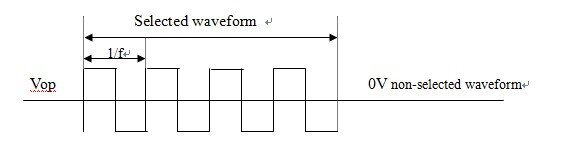
Remark 3: current consumption (I LCD)
Conditions:
(1) Temperature: 25 ℃.
(2) Driving wave type: static waveform
(3) It is suitable for all graphics display and the voltage.
Remark 4: responding time
Remark 5: contrast ratio( C.R )
5.1 Positive display
contrast ratio= brightness (non-selected waveform) / brightness (selected waveform)
5.2 Negative display
contrast ratio= brightness (selected waveform) / brightness (non-selected waveform)
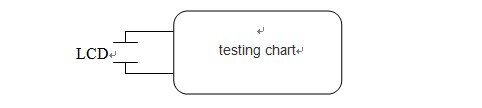
Remark 6: capacitance (C) the method of testing capacitance