
Three visual routes for reception, guidance and interaction
Compare transparent OLED, transparent LCD and 3D holographic cylinder displays for AI reception, guidance and interaction. Select the visual route around your viewing environment, installation and avatar content. Display hardware is the base scope; AI avatar and conversation software for overseas projects can be configured and quoted separately.
DisplayMan — Your Partner in Digital Human Display Engineering

Select an image to jump to its introduction on this page.
This solution reviews three hardware routes for presenting AI avatars, virtual assistants and digital characters: transparent OLED, transparent LCD and an optically presented 3D holographic cylinder. The cylinder is a related LCD-based visual route rather than a transparent display panel.
A normal LCD monitor shows the digital human inside a black or opaque screen area. A transparent display reduces this visual boundary and allows the background, product, cabinet or room environment to remain visible behind the digital character.
This can make the digital human feel more integrated with the physical environment.
The display hardware can be used together with:
A transparent display does not create the AI digital human by itself. The final experience depends on display hardware, AI software, avatar design, rendering quality, voice system, content design, computing hardware and installation environment.
DisplayMan supplies display hardware and integration review as the base scope. AI software, avatar creation, conversation services and overseas deployment can be scoped and quoted separately, or provided by the customer or system integrator.
This solution is suitable for customers who already have, or are planning to develop, a digital human or AI interaction system and need suitable display hardware.
Customers usually consider this solution when they want to:
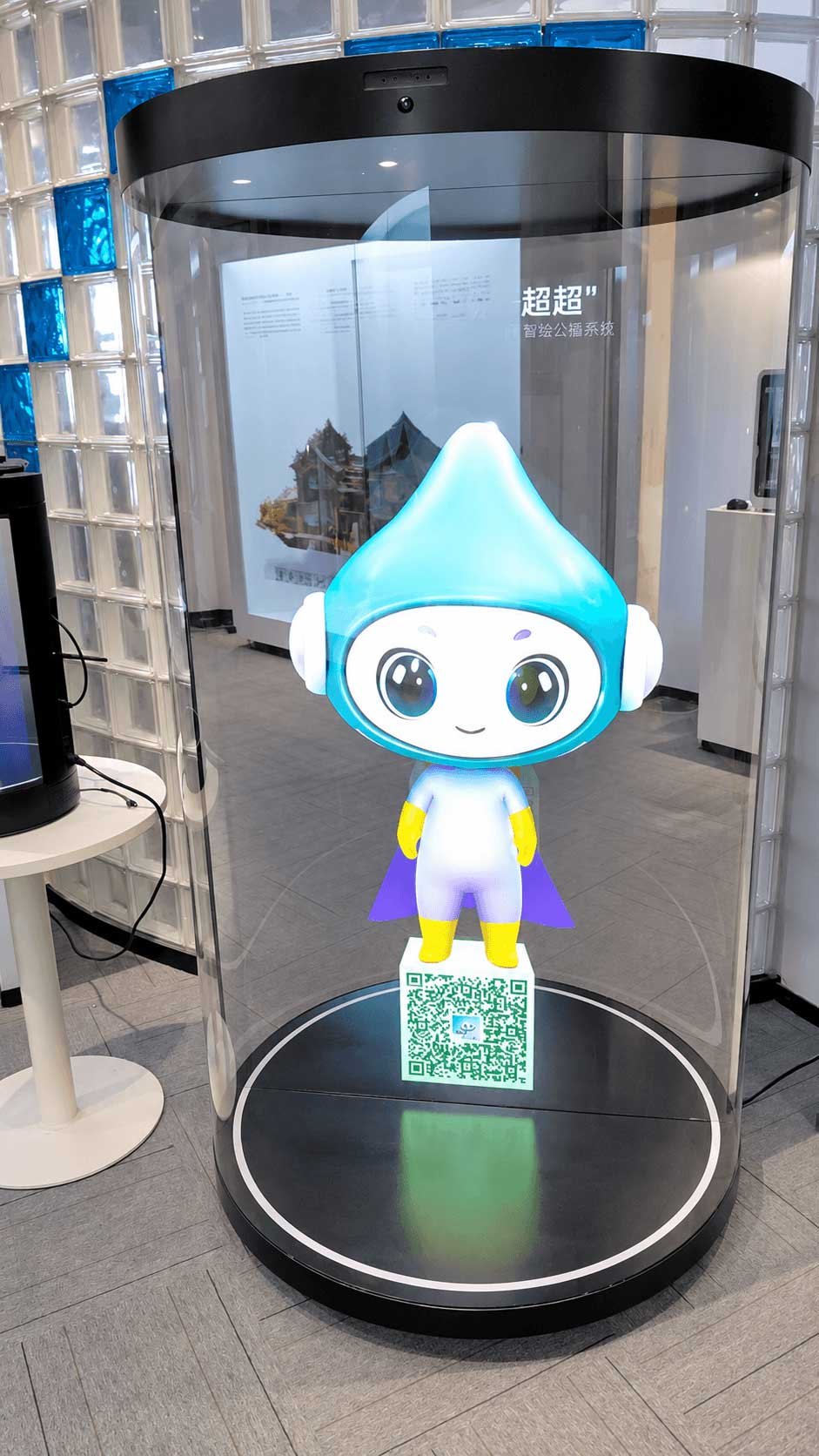
An LCD image with Mini LED backlight technology and the cylinder’s optical structure creates the impression of a person or character within the enclosure. Use it for reception, museum guidance and animated mascots.
21.5″ and 75″ examples are available. Confirm the physical dimensions, viewing effect, interaction hardware and software scope for your project; full 360° viewing is not assumed.
Explore 3D Holographic Cylinder Display →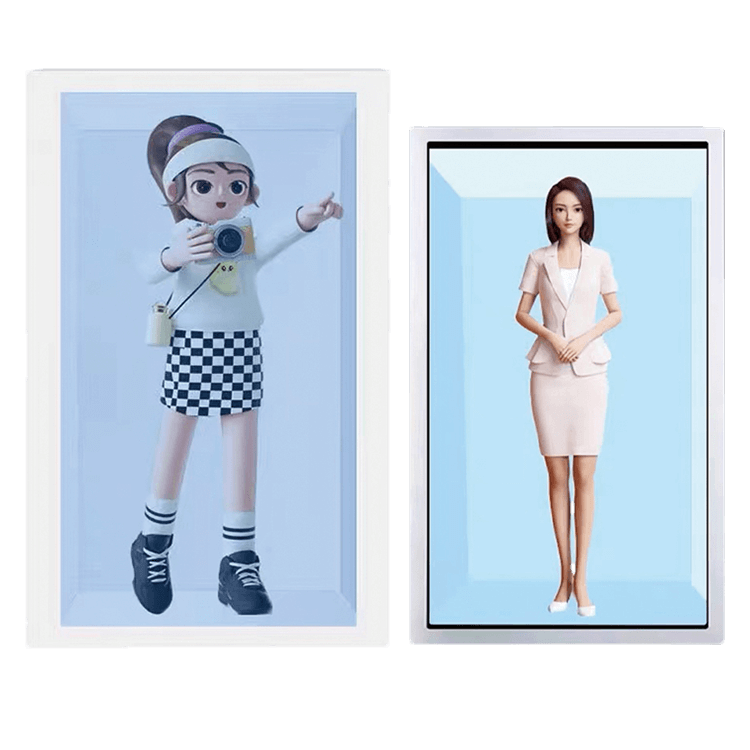
Transparent LCD displays combine a transparent LCD panel with a customized LED light bar. The LED light bar can be configured according to brightness requirements, including high-power LED chips for high-brightness applications or medium-power LED chips for balanced power consumption and cost. This route suits product explanation, service terminals and exhibition cabinets.
Review the panel size, lighting layout, touch interface, media controller and maintenance access alongside the digital human content.
Explore Transparent LCD Digital Human Display →
Self-emissive OLED does not need an LCD rear-lighting box. It is suited to premium reception areas, brand spaces and showrooms where the digital human shares the viewer’s line of sight with the surroundings.
Confirm panel availability, background contrast, glass support, content composition and optional interaction hardware.
Explore Transparent OLED AI Digital Human Display →The display hardware and optical effect differ by route. The software, avatar, voice service and overseas deployment are separate project configuration items.
| Project Factor | 3D Holographic Cylinder | Transparent LCD | Transparent OLED |
|---|---|---|---|
| Image formation | LCD image with Mini LED backlight technology and cylinder optics to create a floating visual impression | Transparent LCD panel with a separately configured LED light bar; high-power or medium-power LED chips selected to meet the project brightness requirement | Self-emissive transparent OLED panel |
| Physical form | Enclosed cylindrical display terminal | Lit cabinet, enclosure or terminal | Open transparent screen or integrated fixture |
| Primary appeal | Attention-grabbing digital human presentation for reception and guided experiences | Integration with products or content inside a controlled enclosure | Premium self-emissive transparent presentation without a separate light bar structure |
| Lighting and viewing | Optical effect depends on image content, cylinder construction, ambient light and viewing position; do not assume full 360° visibility | LED light bar output and scene brightness must be designed together | Ambient light, background contrast and content design affect visibility |
| Interaction | Microphone, speaker, camera, touch and software are configuration-dependent | Touch, voice and camera depend on selected terminal hardware and software | Touch, voice and camera depend on selected structure and software |
| Size planning | 21.5″ and 75″ examples shown; other sizes require engineering review | Panel and cabinet sizes reviewed for the project | Available OLED panel sizes and formats constrain selection |
| AI software | Display hardware is the standard scope. AI digital human software and overseas language or service integration are separately configured and quoted. | ||
Choose the cylinder for a contained floating-style effect, transparent LCD for an illuminated cabinet, or transparent OLED for a premium open presentation. Confirm the exact configuration and software scope before quotation.
Transparent digital human displays can be used in corporate lobbies, hotels, showrooms and visitor centers as a virtual receptionist or brand guide.
Retail brands can use transparent digital human displays to guide customers through products, promotions, brand stories or membership programs.
Transparent digital human displays can be used in exhibitions and showrooms to explain products, introduce company technology or guide visitors through product features.
This is useful when the product has technical information that is difficult to explain with a simple label or video.
Museums, science centers and education spaces can use digital human displays to explain exhibits, guide visitors or present interactive learning content.
Transparent digital human displays can be integrated into smart terminals or service kiosks where AI interaction, information display and self-service operation are required.
A transparent digital human display project usually includes several layers.
Choose the image-forming display and light source according to the desired effect:
Depending on the project, the system may include touch, camera, microphone, speaker, motion sensor, QR code interaction or voice recognition device.
The digital human normally requires a computer, Android system, media player or customer-side computing platform for software, rendering, video playback, touch UI or customer applications.
This is usually provided by the customer or software partner. It may include 3D avatar, AI model, voice recognition, speech synthesis, conversation logic, product knowledge base, brand content, UI design and multilingual content.
The display must be installed into a suitable structure such as a floor-standing terminal, wall-mounted structure, glass cabinet, transparent display box, retail fixture, reception terminal, custom enclosure or showroom installation structure.
The display is only one part of the digital human system. A successful project requires display hardware, software, content, computing and physical structure to work together.
| Component | Function |
|---|---|
| Transparent Display Panel | Shows the digital human or interactive content while keeping the background visible |
| Touch Panel Optional | Supports interactive navigation, product information or user selection |
| Camera Optional | Supports visitor detection, face interaction or software-side recognition if required |
| Microphone Optional | Supports voice input depending on AI software requirement |
| Speaker Optional | Supports voice output and audio content |
| Controller Board | Drives the display and receives signal input |
| Computer / Android Board | Runs customer-side software, media playback or AI application |
| Power Supply | Provides power for display and electronics |
| Glass / Frame / Enclosure | Supports installation and protects the display |
| Cable Assembly | Connects display, touch, camera, audio, power and computing hardware |
| LED Light Bar | Configurable light source for Transparent LCD Displays; chip power and output follow the project brightness requirement |
| Mini LED Backlight Technology | Used in the LCD-based 3D Holographic Cylinder Display route |
| Software Platform | Separately scoped and quoted by DisplayMan, or supplied by the customer or software partner |
DisplayMan reviews the display hardware and integration structure. AI software, avatar rendering and conversation services require separate project scope and quotation when requested from DisplayMan.
| Factor | Normal Monitor | Transparent Digital Human Display |
|---|---|---|
| Visual Style | Avatar appears inside a normal screen | Avatar appears with a more spatial transparent effect |
| Background | Opaque black or digital background | Real environment, product or cabinet can remain visible |
| Installation | Standard monitor or kiosk | Transparent display, glass, frame, lighting and system integration |
| Best For | General digital signage or video playback | AI avatar, virtual guide and premium interactive presentation |
| Cost | Lower | Higher |
| Complexity | Simple | Requires display, structure, software and hardware review |
| Selection Logic | Choose when normal display is enough | Choose when the digital human needs a more advanced physical presentation |
A transparent digital human display is sometimes described as “holographic-like” because it can create a floating or spatial visual impression.
However, it is not a true hologram.
Transparent OLED and LCD routes use display panels. The cylinder uses an LCD image, Mini LED backlight technology and an optical enclosure for a floating-style effect. None should be described as a free-space volumetric hologram.
| Item | Transparent Digital Human Display | True Hologram / Projection System |
|---|---|---|
| Display Method | Transparent screen shows digital content | Uses optical projection or special imaging method |
| Installation | Screen-based structure | Often requires special projection space |
| Brightness and Control | More predictable with display hardware | Depends heavily on optical setup |
| Content | Digital human video, real-time avatar or UI | Specially prepared holographic content |
| Practical Use | More suitable for commercial display hardware integration | More project-specific and installation-sensitive |
Transparent digital human display is a practical commercial display solution. It can create a holographic-like effect, but it should not be described as a true hologram unless the optical system is specifically designed that way.
A digital human project involves more than a display.
To avoid misunderstanding, it is important to separate the responsibilities clearly.
DisplayMan supplies and reviews display hardware. The AI software, avatar and interaction logic may be supplied by your team or separately scoped and quoted by DisplayMan for overseas projects.
Digital human content should be designed for transparent display conditions.
The final visual effect depends heavily on avatar design, background treatment, display brightness, ambient lighting and installation environment.
DisplayMan can review the following items for transparent digital human display projects.
| Review Factor | Why It Matters |
|---|---|
| Application | Determines whether the project is lobby, retail, exhibition, museum, terminal or showroom |
| Display Technology | Transparent OLED and LCD suit different structures |
| Display Size | Affects visual effect, cost and available models |
| Viewing Distance | Determines suitable display size and content design |
| Lighting Environment | Affects image clarity and transparent effect |
| Digital Human Type | Real-time avatar, video loop or interactive AI require different hardware |
| Touch Requirement | Adds touch panel, controller and software review |
| Camera / Microphone | Needed for voice or vision interaction |
| Speaker | Needed for digital human voice output |
| Computing Hardware | Required for AI software, rendering or media playback |
| Operating System | Windows, Android or customer platform affects hardware selection |
| Enclosure Structure | Determines installation, cable routing and heat dissipation |
| Content System | Affects playback, update and interaction method |
| Quantity | Affects quotation, customization and production plan |
| Target Schedule | Helps confirm feasibility and lead time |
Transparent digital human display may not be suitable when:
Transparent digital human display is valuable when the visual presentation of the AI avatar matters. If the project only needs basic information display, a normal screen or touch kiosk is more practical.
Not every project needs a transparent digital human display from the beginning.
If your project is still in the concept, software development, showroom planning, prototype or early evaluation stage, DisplayMan can also help you review simpler display options before moving into a full transparent digital human display structure.
These options may help you test visual effect, present products, build an interactive terminal, support video playback or prepare a more practical first-stage display solution with lower integration risk.
Premium transparent display effect without full AI interaction
If your project only needs a premium transparent visual effect, product presentation or brand display, a standard transparent OLED display may be more practical than a full digital human system.
This direction is suitable for showrooms, museums, luxury retail spaces, brand experience areas and high-end transparent signage.
Explore Transparent OLED Displays →Practical option for product visibility with video content
If your goal is to show a physical product together with video content, a transparent LCD display cabinet may be a lower-risk starting point.
This option is useful for product demos, cosmetics, electronics, jewelry, museums, showroom testing and internal project approval.
Explore Transparent LCD Display Cabinet →Better when the project is mainly product display
If the main goal is to combine real products with digital content in a retail environment, a transparent retail display solution may be more suitable than a digital human display.
This direction is useful for product showcases, retail cabinets, storefront windows, cosmetics counters, jewelry displays and brand product presentation.
Explore Transparent Retail Display Solution →Better for product explanation and brand presentation
If the project needs to explain a product, show technical information or create a modern showroom experience, a transparent exhibition display may be more practical.
This direction is useful for exhibition booths, product showrooms, museums, corporate experience centers and technical product demonstrations.
Explore Transparent Exhibition & Showroom Display Solution →More practical for self-service and information terminals
If your project needs a practical interactive terminal, information kiosk, service screen or customer-facing touch device, a touchscreen all-in-one terminal may be easier to deploy.
This option is often more suitable when transparency is not required and the main focus is touch interaction, software operation and commercial terminal structure.
Explore Touchscreen All-in-One Terminals →Better when only video or information playback is needed
If your project only needs video playback, information display, advertising content or strong readability, a standard digital signage display or high brightness LCD may be more cost-effective.
This direction is suitable for public information screens, retail advertising, window-facing displays, commercial signage and general media playback.
Explore Digital Signage Displays →If the AI avatar experience and transparent spatial effect are important, a transparent digital human display may be worth reviewing. If the project only needs product display, video playback, visitor guidance or a practical self-service terminal, another display solution may be the better first step.
This page should route customers to the right transparent digital human display technology, AI presentation application, practical terminal route, product display route or hardware integration capability.
For premium digital human display projects, start with Transparent OLED AI Digital Human Screen and Transparent OLED Displays. For cabinet-based or terminal-based structures, review Transparent LCD Digital Human Display and Transparent LCD Display Cabinet. If the project is mainly self-service, visitor registration or information interaction, compare with Touchscreen All-in-One Terminals.
| Related Page | When to Visit |
|---|---|
| Transparent Display Solutions | When the customer needs to compare transparent LCD, transparent OLED, transparent LED and transparent Micro LED directions |
| Transparent Exhibition & Showroom Display Solution | When the digital human display is part of an exhibition booth, museum, product showroom or brand experience area |
| Transparent Retail Display Solution | When the digital human is mainly used for retail product guidance, brand presentation or product explanation |
| Corporate & Office Environments | When the digital human display is used in lobbies, reception areas, visitor centers or meeting environments |
| Exhibition, Events & Showrooms | When the project is a booth, museum, science center, showroom or public brand presentation space |
| All-in-One Touch Display PC Solution | When the project needs a practical touch terminal or built-in Android / Windows computing route instead of a transparent display |
| Custom Touch Glass Solution | When the project needs custom touch glass, printed glass, cover glass, holes or premium front-panel design |
| OEM / ODM Display Engineering & Prototyping | When the project needs feasibility review, structure drawings, sample validation, controller matching or pilot-run planning |
| Product / Capability | When It Helps |
|---|---|
| Transparent OLED AI Digital Human Screen | When the project needs a premium transparent OLED digital human display direction |
| Transparent OLED Displays | When the project needs premium transparent visual quality for a close-view digital human or avatar display |
| Transparent LCD Digital Human Display | When the project needs a cabinet-based, terminal-based or controlled-lighting transparent digital human structure |
| Transparent LCD Display Cabinet | When the digital human concept first needs a lower-risk product visibility or display cabinet evaluation route |
| Transparent LED Displays | When the project needs a larger transparent visual area, longer viewing distance or stage-style digital human content |
| Transparent Micro LED Displays | When the project needs ultra-premium transparent technology review and has sufficient budget |
| Touchscreen All-in-One Terminals | When a normal interactive kiosk, visitor guide, service terminal or customer-facing touch system is more practical |
| Digital Signage Displays | When the project only needs video playback, avatar loop content or information display without transparency |
| High Brightness Displays | When the installation environment requires strong readability, window-facing use or bright ambient-light performance |
| Custom Touch Panels & Cover Glass | When touch, cover glass, printed glass, holes, AG / AR / AF coating or premium front structure must be reviewed |
| Infrared Touch Frames | When large-format transparent digital human displays or 32-inch and larger systems need touch function |
| LCD Controller Boards | When HDMI, LVDS, eDP, Android, Windows, media player or signal input matching is required |
| LED Light Bar | Review chip power, brightness, heat and placement as the light source for Transparent LCD Displays |
| Mini LED Backlit LCD Displays | Review Mini LED backlight technology for the LCD-based holographic cylinder route |
| FPC & Cable Assembly | When cable length, connector position, pinout or internal wiring must match the terminal, cabinet or enclosure |
To review or quote a Transparent Digital Human Display project, please provide:
Please also tell us whether your software team already has the avatar, voice system and AI conversation platform.
Open a product page or return to this solution’s Hero.
It is a transparent display solution used to present AI avatars, virtual assistants or digital characters in a more spatial and premium way than a normal monitor.
The base delivery is display hardware. AI software, avatar rendering, conversation logic and overseas deployment can be separately scoped and quoted, or supplied by your software partner.
Use transparent OLED for a premium open presentation, transparent LCD for a controlled cabinet, and the 3D holographic cylinder for a contained floating-style visual. Final selection follows viewing conditions, content and project integration.
These are display-based visual effects rather than free-space volumetric holograms. The cylinder uses optical presentation with an LCD image; the OLED and transparent LCD options use transparent display panels.
Yes, touch can be reviewed as an optional function. It depends on display structure, glass, touch technology, controller, operating system and software requirement.
Voice interaction depends mainly on the customer’s AI software, microphone, speaker and computing system. DisplayMan can help review hardware integration, but the AI voice software can be configured and quoted separately for the project, or supplied by the customer or software partner.
Yes. Transparent OLED digital human displays are often suitable for premium lobby, reception and brand experience spaces, depending on size, budget and installation environment.
Yes. It can be used as a digital product guide, brand presenter or interactive retail assistant. Lighting, viewing distance, product placement and interaction method should be reviewed.
Yes. Exhibition applications are possible, but packing, transport, installation time, display structure and local support must be reviewed carefully.
Send us your application, display size, installation structure, digital human software status, interaction requirement and project schedule. DisplayMan can help review whether Transparent OLED, Transparent LCD or a 3D Holographic Cylinder is more practical.
Tell us your application, display size, digital human software status, installation structure and project stage.
DisplayMan can help review whether Transparent OLED, Transparent LCD, a 3D Holographic Cylinder, or another display solution is more suitable for your digital human project.
The right transparent digital human display solution depends on display technology, AI software status, avatar content, interaction hardware, installation structure and real project feasibility.
