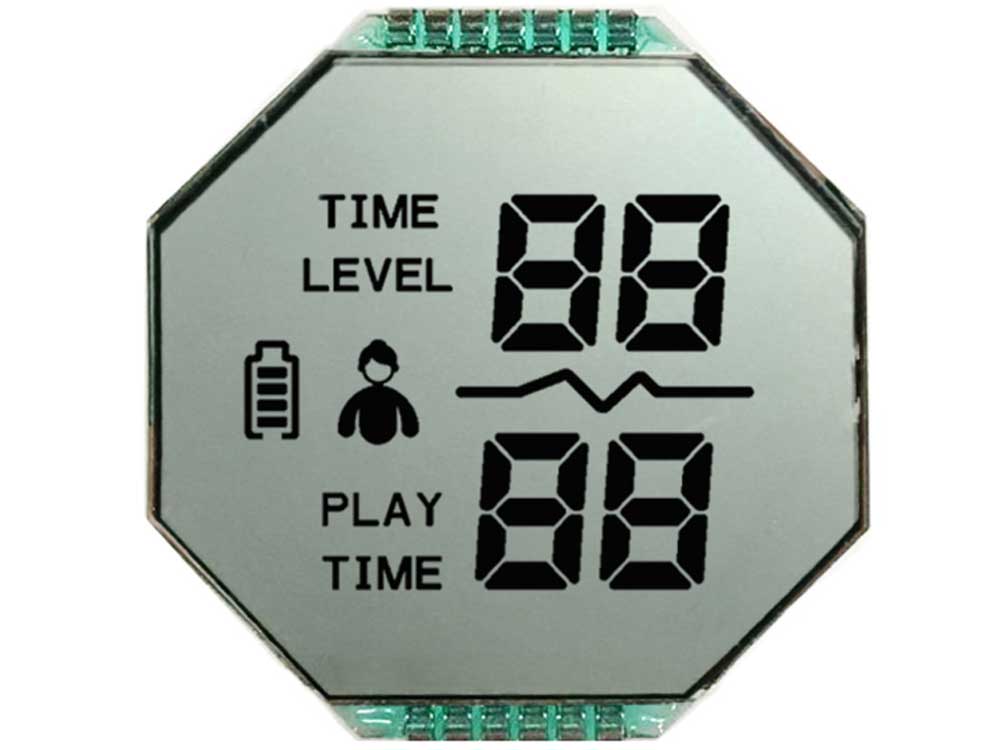
HTN Positive Segment LCD for Time Meters
| Display Type | HTN / Segment |
|---|---|
| Display Size | Customized |
| Display Mode | Positive / Reflective |
| Display Effect | Grey Background and Black Letters |
| Application | Time-meter |
| Backlight | White |

Create a dedicated display layout for readings, status indicators and controls. DisplayMan supports custom segment LCD panels and modules with display-mode, backlight, connection and mechanical options for meters, appliances and OEM equipment.
DisplayMan supplies custom Segment LCD Displays for products that need fixed digits, units, icons, symbols and status indicators at predefined positions.
Segment LCD is widely used in meters, timers, thermostats, medical devices, appliances, industrial controllers, power tools, battery chargers, automotive accessories and portable equipment.
Unlike Character LCD, Graphic LCD or TFT LCD, Segment LCD content is built into the LCD glass and normally requires project-specific tooling.
Choose Segment LCD Displays when the product needs fixed, product-specific display content with low power, high readability and a custom glass layout.
Explore four custom segment LCD examples for meters, lighting equipment, water pumps and massage chairs.
| Display Type | HTN / Segment |
|---|---|
| Display Size | Customized |
| Display Mode | Positive / Reflective |
| Display Effect | Grey Background and Black Letters |
| Application | Time-meter |
| Backlight | White |
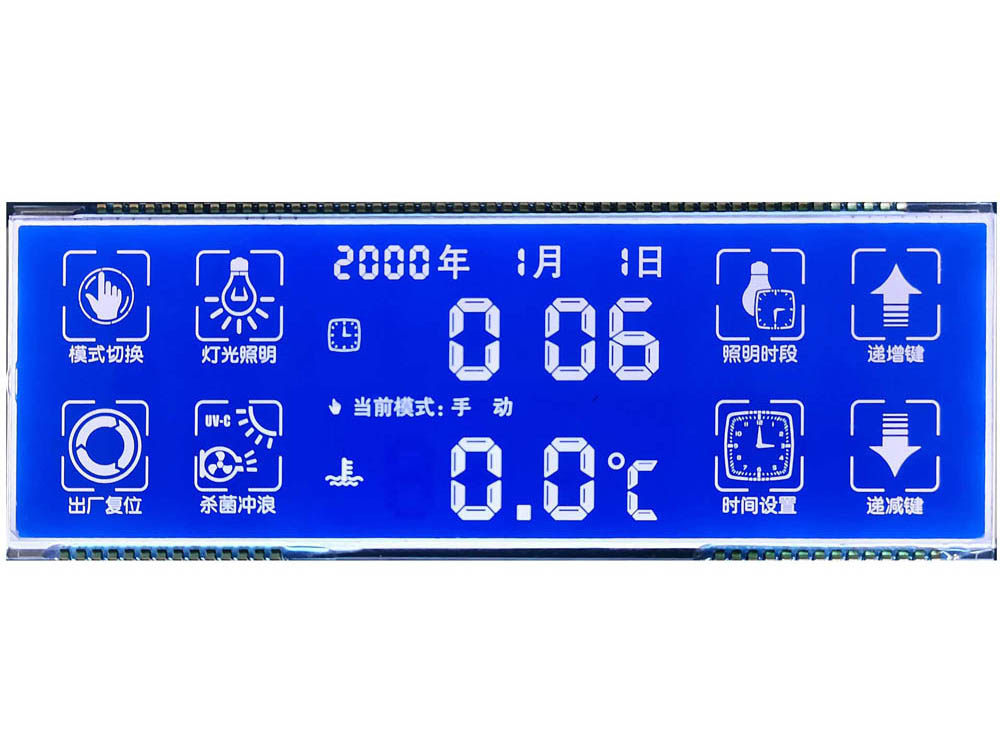
| Display Type | HTN / Segment |
|---|---|
| Display Size | Customized |
| Display Mode | Negative / Transmissive |
| Display Effect | Blue Background and White Letters |
| Application | Illumination Equipment |
| Backlight | Sky Blue |
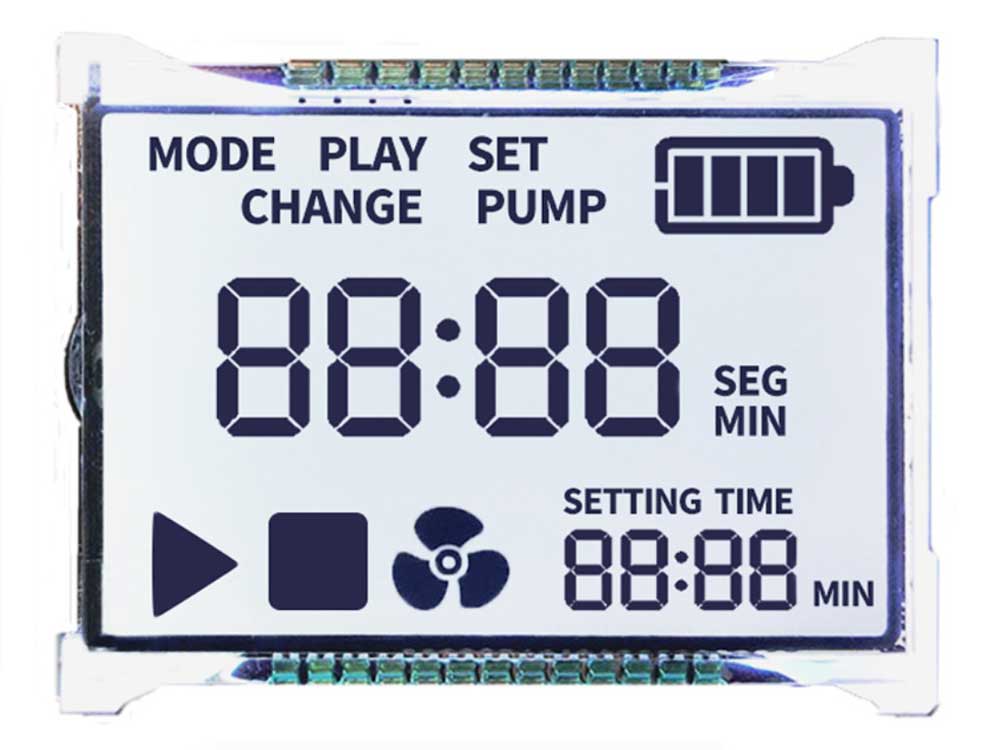
| Display Type | HTN / Segment |
|---|---|
| Display Size | Customized |
| Display Mode | Positive / Transmissive |
| Display Effect | Grey Background and Black Letters |
| Application | Water Pump Machine |
| Backlight | White |
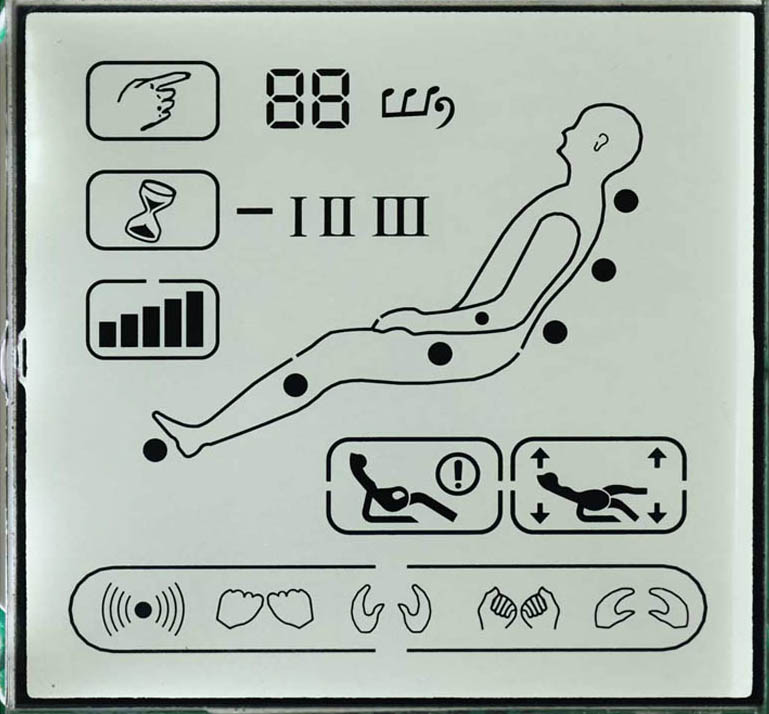
| Display Type | TN / Segment |
|---|---|
| Display Size | Customized |
| Display Mode | Positive / Reflective |
| Display Effect | Grey Background and Black Letters |
| Application | Massage Chair |
| Backlight | None — requires ambient or external light |
Segment LCD projects are normally customized. The following directions describe common optical and structural choices rather than fixed standard models.
| Segment LCD Direction | Display Effect | Backlight Direction | Typical Use |
|---|---|---|---|
| Positive Segment LCD | Light background with dark digits, icons or symbols | Optional | Meters, timers, controllers and appliances |
| Negative Segment LCD | Dark background with illuminated digits, icons or symbols | Usually required | Medical devices, control panels and premium product design |
| Reflective Segment LCD | Uses ambient light and can remain visible without backlight | Usually no backlight | Battery-powered devices, meters and outdoor-readable fixed displays |
| Transmissive Segment LCD | Display visibility depends on backlight | Required | Indoor electronics and illuminated front panels |
| Transflective Segment LCD | Uses ambient light and optional backlight | Optional or recommended | Products used in mixed lighting environments |
| VA Segment LCD | High-contrast black-background appearance | Usually required | Premium controllers, appliances and automotive-style interfaces |
| Segment LCD Module | LCD glass combined with backlight, PCB, connector or support structure | Project-based | OEM equipment requiring a more complete module assembly |
If the required digits, icons, battery symbols, temperature marks and status indicators are fixed, Segment LCD may be more practical than Graphic LCD or TFT LCD.
Each digit, icon and symbol is designed as a fixed segment inside the glass pattern.
The glass can match the product opening, icon positions, units and visual hierarchy.
Suitable for simple interfaces that do not need flexible software graphics.
Segment LCD Displays are selected when the product needs fixed digits, icons or symbols in a custom monochrome LCD glass design.
Predefined digits, icons and status marks can be shown without a flexible pixel-based UI.
Reflective and low-duty designs are suitable for battery products and meters.
The glass pattern can follow the product’s own symbols, layout and viewing window.
For stable high-volume products with fixed content, Segment LCD can be highly practical.
PIN, zebra, FPC, backlight and PCB-module structures can be reviewed.
Old displays can be reproduced when glass, pin, driving and layout details are available.
| Selection Factor | Available Direction | Practical Effect |
|---|---|---|
| TN | Standard monochrome LCD technology | Cost-effective for simple displays and lower multiplex ratios |
| HTN | Improved viewing angle and contrast over standard TN | Suitable for controllers, appliances and industrial interfaces |
| STN / FSTN | Higher multiplex capability and improved optical performance | Suitable for more complex segment layouts |
| VA | High-contrast dark-background display | Suitable for premium appliance and automotive-style interfaces |
| Positive Mode | Dark content on a lighter background | Traditional, clear and readable display effect |
| Negative Mode | Light content on a dark background | Modern appearance and usually backlight-dependent |
| Reflective | Uses ambient light | Low power and no continuous backlight requirement |
| Transmissive | Relies on backlight | Suitable for indoor illuminated products |
| Transflective | Uses ambient light and backlight | Suitable for mixed-light environments |
Contrast, viewing angle, multiplex ratio, backlight color, operating temperature and product appearance all affect the correct LCD direction.
| Factor | Options | Selection Logic |
|---|---|---|
| Static Driving | One segment controlled directly | Simple, strong contrast and more pins |
| Multiplex Driving | Shared COM and SEG electrodes | Reduces pin count and supports more segments |
| Duty and Bias | Project-based electrical design | Affects voltage, contrast, ghosting and driver selection |
| PIN Connection | Metal pins directly from the glass | Useful for through-hole or direct PCB assembly |
| Zebra Connection | Elastomer between glass and PCB | Useful for compact pressure-mounted assemblies |
| FPC Connection | Flexible printed circuit | Useful where cable direction and space are constrained |
| COB Module | Glass, PCB, driver IC and optional backlight | Useful when a more complete module is required |
Segment count, COM count, duty, bias, voltage, driver IC, pin definition and customer PCB must be reviewed before quotation and tooling.
Segment LCD is highly customizable, but new glass requires tooling. The display layout, icon drawing, electrical driving method, connection structure, quantity and acceptance criteria should be confirmed before quotation.
| Requirement | Segment LCD Display | Character LCD Display |
|---|---|---|
| Display Content | Fixed product-specific digits, icons and symbols | Fixed rows of letters and numbers |
| Custom Layout | Highly flexible for fixed content | Limited to character positions |
| Tooling | Usually required | Standard modules often available |
| Power Direction | Can be very low power | Moderate depending on module and backlight |
| Best For | Meters, appliances, icons and status displays | Text menus, numbers and simple messages |
| Selection Logic | Choose when content is fixed and customized | Choose when standard text rows are enough |
| Requirement | Segment LCD Display | Graphic LCD Display |
|---|---|---|
| Display Structure | Fixed custom segments | Pixel matrix |
| UI Flexibility | Fixed after tooling | Flexible software-controlled content |
| Custom Icons | Built into LCD glass | Drawn by software |
| Power Direction | Usually lower | Usually higher |
| Development | Requires tooling and layout confirmation | Requires controller and UI programming |
| Best For | Fixed icons, digits and symbols | Menus, curves and flexible graphics |
| Requirement | Segment LCD Display | TFT LCD Display |
|---|---|---|
| Display Content | Fixed monochrome digits, icons and symbols | Full-color graphics, images, video and modern UI |
| Power | Can be very low | Usually higher due to backlight and processing |
| Layout | Tooling-based fixed design | Software-based flexible UI |
| Cost Direction | Practical for fixed high-volume products | Practical for color and flexible content |
| Best For | Meters, appliances and simple controls | Smart terminals, HMI and multimedia products |
| Selection Logic | Choose when simple fixed content is enough | Choose when full-color or flexible UI is required |
Digits, units, communication icons, alarms and battery indicators.
Time, temperature, modes, schedules and status symbols.
Operating modes, settings, icons, temperature and program status.
Measurements, units, warnings, battery icons and fixed status information.
Battery level, charging status, modes and warning symbols.
Parameters, units, alarms, operating states and fixed icons.
Temperature, voltage, timer, status and premium VA display effects.
Time, speed, level, program and fixed product indicators.
Exact glass, segment, pin, drive and backlight matching.
Digits, icons, units, battery marks and status symbols that will not need flexible software changes.
Glass size, viewing area, digit height, icons, symbols and exact relative positions.
TN, HTN, STN, FSTN or VA; positive or negative; reflective, transmissive or transflective.
Static or multiplex, voltage, duty, bias, PIN, zebra, FPC or COB module structure.
Backlight color, light guide, printing, viewing direction, glass thickness and mounting.
Tooling cost, sample quantity, production forecast, temperature, acceptance criteria and schedule.
Segment LCD is the correct product when the display content is fixed and product-specific.
| Product Page | Choose This When |
|---|---|
| Monochrome LCD Displays | Main monochrome LCD product entry and general selection |
| Character LCD Displays | Fixed rows of letters, numbers or simple text |
| Graphic LCD Displays | Pixel-based graphics, menus or flexible monochrome UI |
| Dot Matrix LCD Displays | Matrix-style text or graphics |
| COB LCD Displays | PCB-based monochrome module structure |
| COG LCD Displays | Compact IC-on-glass monochrome module |
| TFT LCD Displays | Full-color graphics, images, animation or video |
Even a simple sketch showing the viewing area, digits, icons, units and approximate positions can help start the feasibility review.
MONOCHROME LCD FAMILY
Visit a category page for product images, specifications and integration options.
A Segment LCD Display is a custom monochrome LCD designed to show fixed digits, icons, symbols and status indicators at predefined positions.
No. Character LCD uses standard character cells such as 16×2 or 20×4. Segment LCD uses custom-designed digits, icons and symbols built directly into the LCD glass.
No. Graphic LCD uses a pixel matrix and can display flexible software-controlled graphics. Segment LCD content is fixed after the LCD glass pattern is designed.
Segment LCD is monochrome, fixed-content and can be very low power. TFT LCD supports full-color graphics, images, animation and video.
Choose Segment LCD when the display content is fixed, product-specific and unlikely to change, such as digits, units, icons, battery symbols and status marks.
Yes. New segment layouts usually require custom LCD tooling because the segment pattern is built into the LCD glass.
A Positive Segment LCD normally has a lighter background with dark digits, icons or symbols.
A Negative Segment LCD normally has a darker background with illuminated digits, icons or symbols and usually requires a suitable backlight.
Reflective LCD uses ambient light and usually needs no backlight. Transmissive LCD relies on backlight. Transflective LCD can use ambient light and backlight.
VA Segment LCD uses vertical-alignment technology to create a high-contrast dark-background effect, often used in premium appliance, controller and automotive-style interfaces.
Segment LCD projects can use TN, HTN, STN, FSTN or VA technology depending on contrast, viewing angle, multiplex ratio, color effect, temperature and cost.
Yes. LED backlight color, light guide, brightness, current and mechanical structure can be reviewed according to the display mode and product design.
Common connection structures include PIN, zebra, FPC and PCB-based COB modules. The correct direction depends on glass size, product assembly and customer electronics.
Static driving controls each segment directly. Multiplex driving shares electrodes to reduce pin count and support more segments, but duty, bias, voltage and contrast must be reviewed together.
Yes. Reflective and low-duty Segment LCD designs are widely used in meters, timers, portable instruments and other low-power products.
Yes. Please provide the old LCD sample, photos, glass outline, viewing area, segment layout, pin details, driving information, backlight and product information.
The display content is fixed after tooling. It cannot freely show new graphics, images, video or changing software layouts like Graphic LCD or TFT LCD.
Please provide LCD glass size, viewing area, segment layout, digits, icons, display mode, LCD technology, backlight, driving method, voltage, connection type, viewing direction, temperature, quantity, schedule and available drawings or samples.
Send us the LCD size, viewing area, segment layout, digits, icons, display mode, backlight, driving method, connection structure, temperature, quantity and schedule.
DisplayMan will review whether a custom Segment LCD is the correct direction and what glass, driving, backlight and connection structure best match the product.
Segment LCD is intended for fixed, product-specific content. A clear display layout and realistic quantity forecast are required before tooling and quotation.