
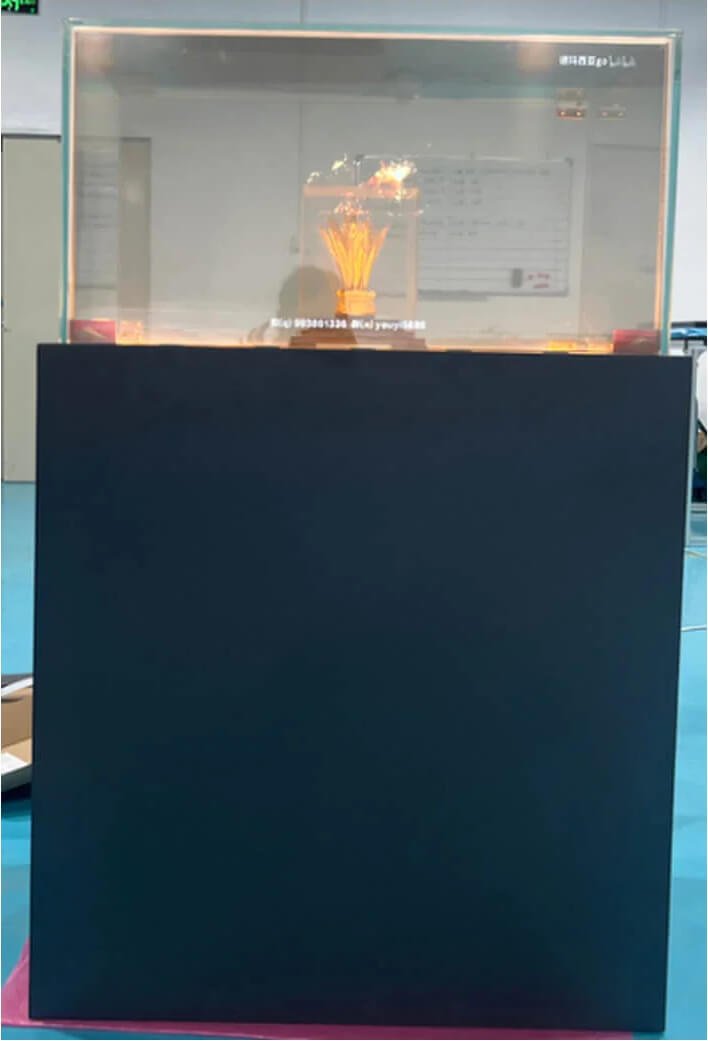
Transparent OLED Display Cabinet · 30-Inch Model

30-Inch Transparent OLED Display Cabinet

Interactive Product Showcase with Capacitive Touch Screen

Combine a physical product with digital labels, animations and interactive information. This 30-inch transparent OLED display cabinet places a landscape screen in front of the exhibit space, with a freestanding base below. The TA-30S-06 reference includes capacitive touch and a configurable host for museums, retail and showrooms.

1366 × 768 Pixels43% Reference TransparencyCapacitive Touch ScreenHDMI Input120 Hz Panel Reference
30-inch transparent OLED display cabinet product reference
Product Overview

Put the Product and Its Digital Story in One Showcase

All four sides of the cabinet are transparent. The standard configuration uses one transparent OLED display face and three clear glass faces, allowing visitors to view the physical exhibit from multiple directions. A custom configuration can use transparent OLED displays on all four sides.

Physical Exhibit Space

The standard cabinet combines one active transparent OLED face with three clear glass faces. Review the object size, weight, viewing positions and access opening together with the usable exhibit space and load capacity.

Interactive Product Information

The supplied reference lists capacitive touch. Build a product selector, exhibit introduction or guided demonstration using software configured for the host system.

Freestanding Cabinet Structure

The photographed reference combines an upper transparent enclosure with a lower pedestal. For a custom four-sided transparent OLED cabinet, specify the content on each face, controller arrangement, overall dimensions and service access.

Product Gallery

30-Inch Transparent OLED Display Cabinet Views

Technical Specifications

30-Inch Display Cabinet Specifications

ItemReference configuration
Reference modelTA-30S-06
Display30-inch landscape transparent OLED display cabinet
Native resolution1366 × 768 pixels
Active display area664.29 × 373.48 mm reference
Transparency43% typical reference; final configuration to be confirmed
Luminance200–600 cd/m² reference range; automatic adjustment listed in the source
Panel refresh rate120 Hz reference; confirm supported controller and source timing
Viewing angle178° horizontal / 178° vertical reference
Contrast ratio135,000:1 reference
Response time0.1 ms G-to-G reference
Color depth10-bit / 1.07 billion colors reference
Touch screenCapacitive touch in the supplied reference configuration
Host configurationIntel Core i5-6500T; 8 GB RAM + 128 GB storage reference, configurable by project
Operating systemWindows 10 listed in the original reference; confirm the operating system supplied with your order
Host connections4 × USB, microphone, DC input, Ethernet and COM listed; confirm final port layout
Video inputHDMI / VGA mentioned in the source; confirm fitted inputs and controller arrangement
Network10/100 Ethernet, Wi-Fi and Bluetooth 4.2 listed in the reference
Supply input100–240 VAC, 50/60 Hz
Operating environment0–40 °C; 20–80% humidity reference
Daily operation7–12 hours listed in the source; confirm your required schedule
Standard transparent sidesFour transparent faces: one transparent OLED display and three clear glass faces
Custom display configurationTransparent OLED displays on all four sides available by customization; confirm content, controllers and integration scope
Cabinet dimensions and exhibit spaceRefer to the approved cabinet drawing; confirm overall footprint, usable internal space and object load

Reference values are taken from the supplied TA-30S-06 specification. Brightness, transparency and contrast describe separate measurement conditions. Confirm controller timing, complete assembly dimensions and final supplied configuration before integration.

Engineering Drawing

Plan the Cabinet and Exhibit Space

Use the cabinet-specific drawing for installation planning. Confirm final external dimensions, internal exhibit space, access opening, object load and service clearance before fabrication or site preparation.

Cabinet Integration

Coordinate the Object, Display and Interactive System

Object Access and Lighting

Plan how the product will be placed and removed. Confirm opening direction, access clearances and the supplied lighting arrangement. Test reflections and object visibility with the intended content.

Touch, Host and Playback

The reference includes capacitive touch and lists an Intel Core i5 host with 8 GB RAM and 128 GB storage. Confirm operating system, fitted inputs, touch connection and application software in the quotation.

Cabinet Construction and Scope

Review glass, finishes, access hardware, base support and cable routing. Confirm separately any lock, alarm, environmental control or conservation requirement for valuable exhibits.

Define the delivery scope: display cabinet hardware, host computer, touch software, content, object fixtures, lighting and shipping packaging. Final supplied items should be listed in the quotation.

Applications

Where a 30-Inch Transparent OLED Cabinet Fits

Museums and Science Centers

Display an artifact or teaching object with digital labels and animations. Review lighting, object access and any conservation requirements with the exhibition team.

Retail Product Showcases

Explain product details and features in front of the actual item. Test screen graphics against the merchandise size, finish and rear scene.

Brand and Technology Showrooms

Use touch navigation to guide visitors through a product story or demonstration. Coordinate content, object fixtures and viewing height around the installation.

Content Preparation

Keep the Physical Exhibit Visible

Create content for the native 1366 × 768 pixel canvas. Use dark backgrounds and place labels around the object rather than covering it with large illuminated blocks.

Test the actual exhibit, internal lighting and room reflections together. Use clear touch targets and short navigation paths; confirm a return-to-home behavior if the cabinet is shared by visitors.

FAQ

30-Inch Transparent OLED Display Cabinet Questions

Does this cabinet include a touch screen?

The supplied TA-30S-06 reference lists capacitive touch. Confirm the touch connection, host configuration and interactive software in the final quotation.

How large an object can fit inside?

The usable internal exhibit dimensions are configuration-specific. Send the object dimensions and weight so that the exhibit space, access opening, supports and load capacity can be reviewed.

Are all four sides transparent OLED displays?

All four sides are transparent, but the standard configuration has one transparent OLED display face and three clear glass faces. A custom cabinet can use transparent OLED displays on all four sides. Specify the required display faces and content arrangement for a quotation.

What resolution and transparency are listed?

The source lists 1366 × 768 pixels, a 664.29 × 373.48 mm active area and 43% typical transparency marked TBD. Confirm the final supplied configuration and test object visibility with actual content and lighting.

Are locks, lighting and museum environmental controls included?

The supplied specification does not establish a full security or conservation package. Confirm access hardware, lighting, alarms and any humidity or temperature control separately.

Can I supply my own content and software?

Define the playback source and interactive application around the selected host. The reference mentions HDMI, VGA and USB, but the fitted connections, software and content scope must be confirmed for the supplied assembly.

Is the cabinet suitable for outdoor or 24/7 operation?

The reference lists 0–40 °C, 20–80% humidity and 7–12 hours of daily operation. Outdoor protection and continuous 24/7 operation are not established by this specification.

What should I send for a cabinet quotation?

Send the object dimensions and weight, installation photos, available footprint, touch and software requirements, desired finishes, operating schedule, quantity, destination and delivery target.

Review Your Transparent Display Cabinet Project

Build Your 30-Inch Transparent OLED Product Showcase

Send the object dimensions, installation space and content ideas. We will review the cabinet, display, touch configuration and delivery scope.

Include the object weight, required access, finishes, lighting, daily operating schedule and delivery destination.

Send Your Display Requirement

Please share your application, display size, quantity and project background. We will review the most practical display direction.