Home | Products | Transparent OLED Sliding-Rail Display | Transparent OLED Sliding-Rail Display
Motorized Transparent OLED Experience

Transparent OLED Sliding-Rail Display

Move Digital Content Across Real Products, Timelines and Exhibits

DisplayMan adapts a floor-standing transparent OLED display to a motorized rail by adding wheels beneath its fixed base. The complete display moves horizontally while digital content remains visually connected to the real product, exhibit or timeline behind it.

55″ MainstreamBottom Rail or Dual RailPosition-Based ContentProject Integration
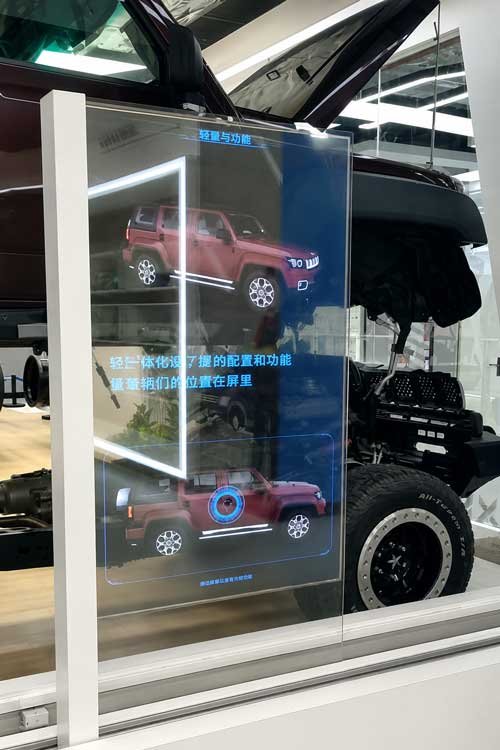
Transparent OLED sliding-rail display moving in front of an automotive exhibit
Moving Transparent Information Layer

What Is a Transparent OLED Sliding-Rail Display?

A Transparent OLED Sliding-Rail Display is based on a floor-standing transparent OLED structure. Wheels are added beneath the fixed base and connected to a motorized rail so the complete display can move to programmed positions and present content related to the object or information behind it.

Digital Content Without Hiding the Exhibit

Visitors can view video, graphics and information on the OLED while continuing to see the physical exhibit or background through the screen. This is the main difference from a conventional opaque moving LCD.

Motion Connected to Content

The system can change content according to the screen position. A moving OLED can introduce different components of a vehicle, stages of a company timeline or products arranged along an exhibition wall.

55 Inches Is the Mainstream Direction

Most sliding-rail projects use one 55-inch portrait transparent OLED. A 30-inch display can be evaluated for a limited number of compact installations, while two 55-inch portrait displays are stacked vertically only when an exceptionally tall moving display area is required.

Two Independent Design Decisions

First Choose the Frame, Then Choose the Rail System

Frame protection and rail quantity solve different engineering requirements. Compare the frame structures first, then compare the standard single-rail system with the extra-tall dual-rail system.

Comparison 1 — Frame Structure

Single-Side Frame vs Fully Framed

Both configurations normally use one 55-inch portrait transparent OLED and one motorized bottom rail. The choice is mainly between maximum visual openness and additional edge protection.

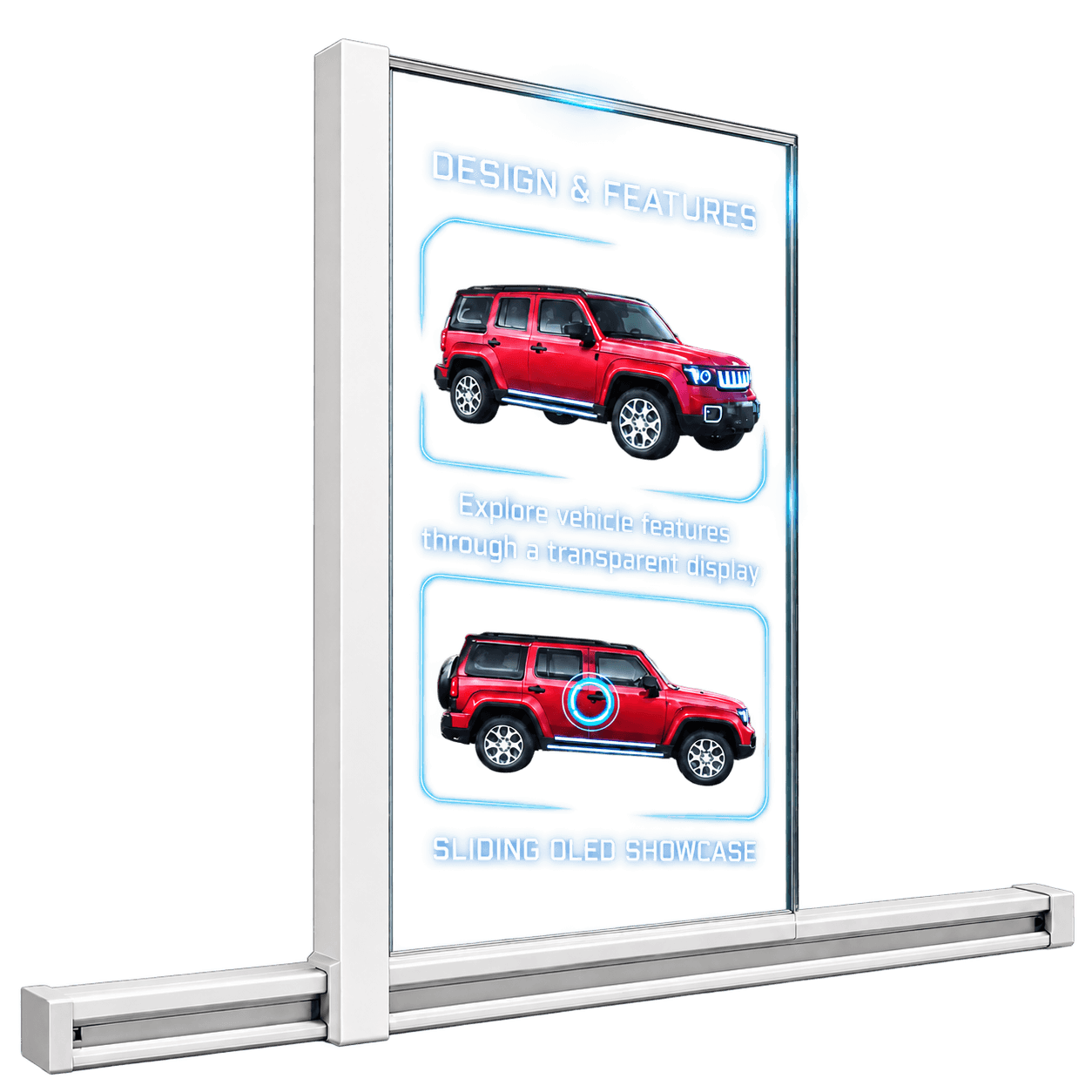
55-inch transparent OLED sliding-rail display with a left-side cable-routing frame and bottom rail
Maximum Visual Openness

Single-Side Frame

One side column provides structural support and integrated cable routing. It can be positioned on the left or right according to the installation.

  • Normally 1 × 55-inch portrait OLED
  • Left- or right-side cable-routing column
  • Other three sides remain visually open
  • Lighter appearance and maximum transparency
  • Best when the OLED edges are protected from direct visitor contact
55-inch fully framed transparent OLED sliding-rail display with a bottom rail
Additional Safety Protection

Fully Framed

A complete perimeter frame protects all four OLED edges and increases mechanical rigidity without changing the standard bottom-rail principle.

  • Normally 1 × 55-inch portrait OLED
  • Four-sided protective frame
  • Cables concealed inside the frame
  • Better protection in museums and public environments
  • Full framing does not automatically require an upper rail
Frame selection: Choose the single-side frame when visual openness is the priority. Choose the fully framed structure when edge protection, rigidity and public safety are more important.
Comparison 2 — Rail System

Bottom Single Rail vs Upper + Lower Dual Rails

Rail quantity is determined mainly by the height of the complete moving display assembly. One 55-inch portrait OLED normally uses the bottom rail; an upper guide rail is added for two vertically stacked 55-inch panels.

single 55-inch transparent OLED sliding-rail display using one motorized bottom rail
Mainstream Rail System

Bottom Single Rail

The fixed base of a standard floor-standing transparent OLED is fitted with rail wheels and connected to one motorized bottom rail.

  • Normally 1 × 55-inch portrait OLED
  • Works with either single-side or full framing
  • Bottom rail provides support and motorized movement
  • Simpler structure, installation and maintenance
  • Used for the majority of sliding-rail projects
two 55-inch portrait transparent OLED panels stacked vertically on upper and lower sliding rails
Extra-Tall Rail System

Upper + Lower Dual Rails

Two 55-inch portrait OLED panels are stacked top-to-bottom, making the complete moving display assembly exceptionally tall. The second rail stabilizes this increased height.

  • 2 × 55-inch portrait OLED panels stacked vertically
  • Lower rail provides primary support and motorized movement
  • Upper rail provides alignment and anti-sway guidance
  • Suitable for full-height digital-human content
  • Selected for exceptional display height, not simply because the frame is enclosed
Rail selection: Use the bottom single rail for the mainstream one-screen structure. Use upper and lower rails when two 55-inch portrait OLED panels are stacked vertically and the moving component becomes exceptionally tall.
Why Transparent OLED

Advantages of a Transparent OLED Sliding Display

Visible Physical Background

The product, artifact, machine or printed wall behind the display remains part of the visitor experience.

Position-Based Storytelling

Content can change at different rail positions to explain specific objects, dates, components or milestones.

Premium OLED Image

Self-emissive OLED pixels create deep black areas and visually floating graphics without a separate backlight.

Controlled Motorized Movement

Travel speed, direction, acceleration, stopping points and operating sequence can be configured for the project.

Flexible Exhibition Logic

The system can support automatic loops, guided presentations, buttons, sensors or project-specific control software.

Architectural Integration

The rail, housing, base, wall structure and cable path can be coordinated with the exhibition environment.

Complete Motion and Content System

How the Sliding-Rail Display Works

The screen position and displayed content are coordinated through a complete control architecture rather than treated as separate devices.

Content SourceVideo, graphics, application or CMS
System ControllerPlayback logic and position commands
Motorized RailMovement, speed and stopping control
Transparent OLEDMoving digital information layer
Real ExhibitVisible product, timeline or background

Motion and Mechanical System

  • Wheels added beneath the floor-standing display’s fixed base
  • Custom bottom-rail length and horizontal travel distance
  • Optional upper guide rail for an extra-tall vertical stack
  • Speed, acceleration, stopping positions and limit protection
  • Left-side, right-side or fully framed cable-routing structure

Content System

  • Content changes linked to physical position
  • Automatic playback or guided operation
  • HDMI, player, computer or project controller
  • Optional touch, button, sensor or software interaction
  • Project-specific visual content and background design
Precision Motion Platform

Motorized Sliding-Rail Hardware

The rail and drive system are engineered around the display load, travel length, operating environment, motion profile and required safety protection.

Rail Construction

  • High-strength rigid construction for smooth, stable and quiet high-speed movement
  • Anodized aluminum surface for improved corrosion resistance
  • Side and bottom sliding-nut channels simplify mounting and limit-switch positioning
  • Rail length can be configured for the actual exhibition space and travel requirement

Drive and Motion Control

  • Stepless PWM speed control
  • Smooth transition between acceleration, constant speed, deceleration, start and stop
  • Brushless DC / stepper and AC servo drive options for different project requirements
  • Software-configurable information points with positioning accuracy up to 0.5 cm

Electrical Safety and Protection

  • Optocoupler-isolated control ports separate the motor drive from the control system
  • High- and low-voltage circuits are separated to improve electrical safety and interference immunity
  • Resistance or stall detection stops the motor when movement is obstructed
  • Independent lower-level control can apply electronic braking if the host computer or communication link fails
  • Fault detection, protective logic and power-loss position memory are available
Safety Functions Are Part of the Complete Mechanical Design

Motor protection does not replace the need to evaluate rail load, braking distance, visitor access, obstruction risks, limit positions, frame protection and emergency operating logic for the actual installation.

Position-Synchronized Presentation

Sliding-Rail Control Software

The control software links screen movement, stopping positions, media playback and visitor interaction so the OLED presents the correct information at each physical location.

Position and Content Logic

  • Add and reposition information points through software without changing the decorative wall
  • Automatically switch synchronized background pages at programmed positions
  • Use images, video, dynamic text, animated icons or digital-human presentations
  • Support automatic motorized operation or selectable manual operation
  • Retain position information after restart or power interruption

Interaction and Control Options

  • Infrared or capacitive touchscreen control
  • Central-control system integration
  • Manual push-pull operation, physical buttons or wireless remote control
  • iPad, iPhone and Android device control
  • Human-presence sensor triggering
  • Embedded PowerPoint operation with touchscreen interaction

System Integration and Reliability

  • Customer-defined software and secondary development support
  • Multi-screen synchronization from one main control platform
  • Background-video synchronization for motorized-door or multi-display installations
  • External web-page access for connected information content
  • Watchdog recovery with automatic return when the system or application crashes
  • Optimized integrated-graphics playback for smooth operation
Functions Are Selected Per Project

The final software package depends on the number of displays, stopping points, media format, interaction method, network environment, host hardware and required third-party integration.

Mainstream Display Configuration

55-Inch Transparent OLED Reference Specifications

The 55-inch portrait transparent OLED is the standard starting point for most sliding-rail projects. The values below describe the display reference; rail length, frame, controller, touch, movement speed and overall system dimensions are confirmed separately for each installation.

55-Inch Display ItemReference Specification
Display TechnologySelf-emissive Transparent OLED
Resolution1920 × 1080 (FHD)
Active Display Area1206.53 × 678.67 mm
Brightness200–600 cd/m², configuration dependent
TransparencyApprox. 45% typical; subject to the selected panel configuration
Viewing Angle178° / 178°
Response Time0.1 ms G-to-G reference
Color Depth10-bit, 1.07 billion colors
OrientationPortrait for the mainstream sliding-rail configuration
TouchOptional capacitive touch; structure and moving cable path require confirmation
Power InputAC 100–240 V, 50/60 Hz
Operating EnvironmentIndoor controlled environment; 0–40°C and 20%–80% RH reference
Display Data and Rail-System Data Are Confirmed Separately

The OLED specifications above do not define the finished sliding-rail system. Final frame size, weight, rail length, travel distance, number of stopping positions, speed, control method, cable routing and safety protection depend on the project.

Six Transparent OLED Projects

Transparent OLED Sliding-Rail Display Videos

These projects show how a moving transparent OLED can connect digital content with real products, exhibition objects, digital-human presentations and timeline walls.

2 × 55-Inch OLED

Interactive Exhibition Overlay

Two 55-inch transparent OLED panels are combined into one larger moving display surface for an immersive physical-product overlay.

55-Inch OLED

Single 55-Inch Sliding-Rail Display

A standard 55-inch floor-standing transparent OLED structure is fitted with wheels at its fixed base and integrated with the motorized rail system.

Engineering

Rail Installation and Motion Test

A behind-the-scenes view of the long-distance guide structure and movement testing before commissioning.

2 × 55-Inch Dual Rail

Extra-Tall Digital Human Display

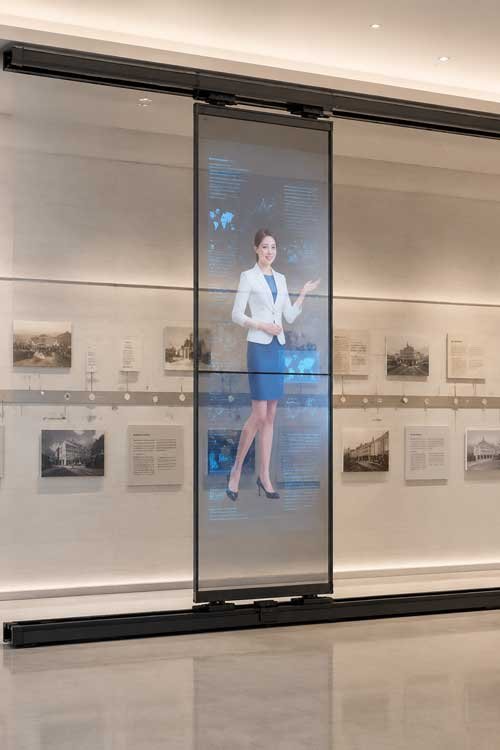
Two 55-inch portrait OLED panels are stacked vertically. Upper and lower rails stabilize the exceptionally tall moving assembly while digital-human content spans the full display height.

Single-Side Frame

55-Inch Automotive Sliding-Rail Display

A single 55-inch transparent OLED uses a left-side cable-routing frame and moves along the motorized bottom rail while the vehicle remains visible behind the content.

Fully Framed

55-Inch Corporate Timeline Display

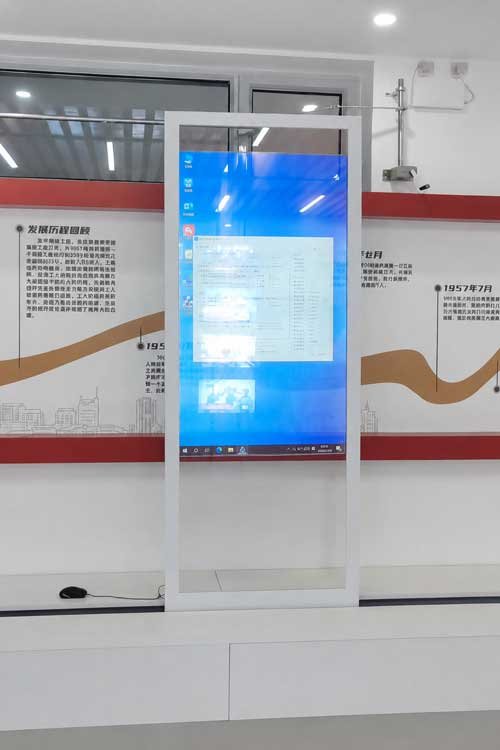
A four-sided protective frame secures the single 55-inch OLED as it moves along the bottom rail and connects digital content with different milestones on the history wall.

Application Directions

Where Sliding-Rail Transparent OLED Creates Value

Automotive Showrooms

Move across a vehicle to introduce exterior features, components, technology and product options.

Museums and Science Centers

Connect digital explanations with artifacts, models, machines and physical exhibits.

Corporate History Walls

Link screen position to company milestones, products, founders and development stages.

Industrial Product Displays

Explain equipment functions while keeping assemblies and components visible through the OLED.

Premium Retail

Add moving graphics and product information without enclosing or visually hiding the merchandise.

Digital Human Exhibitions

Combine animated presenters, information and motion for guided visitor experiences.

Technology Comparison

Transparent OLED vs LCD Sliding-Rail Displays

Both technologies can use a motorized rail and position-based content, but the screen technology creates a fundamentally different visitor experience.

ComparisonTransparent OLED Sliding-Rail DisplaySliding-Rail LCD Display
Background visibilityPhysical products and background graphics remain visible through the screen.The LCD is opaque and covers the area directly behind it.
Visual effectDigital graphics appear to float in front of the real exhibit.A complete rectangular video image moves across the wall.
Best contentOverlays, highlights, labels, animation and transparent-background content.Full-screen video, text, maps, timelines and high-contrast information.
Best applicationsVehicles, machinery, artifacts, premium products and visually open exhibition walls.Information walls, timelines and installations where background visibility is unnecessary.
Project priorityPremium transparency and integration of digital content with real objects.Strong conventional image visibility and practical moving-screen presentation.
Selection Principle

Choose Transparent OLED when the physical subject behind the screen must remain visible. Choose LCD when a solid, opaque and high-contrast video image is more important than transparency.

Sliding-Rail LCD Reference Videos

The following examples are clearly identified as conventional opaque LCD systems and are included only to demonstrate the alternative display route.

Opaque LCD

LCD Rail and Position Test

An exposed engineering test shows the motorized rail, portrait LCD and managed moving cable path.

Opaque LCD

LCD Exhibition-Wall Installation

A completed moving LCD installation demonstrates the traditional opaque-screen approach.

Opaque LCD

LCD Technology Timeline

The portrait LCD moves across a dark timeline wall and changes information at different positions.

Project Selection

When a Transparent OLED Sliding-Rail Display Is the Right Choice

The sliding-rail format is most valuable when motion, screen position and transparent digital content must work together with a real exhibition background.

Suitable For

  • Automotive showrooms, museums, experience centers and corporate exhibition walls
  • Projects where products, artifacts, machinery or printed graphics must remain visible behind the screen
  • Position-based storytelling linked to different physical objects or timeline points
  • Premium interactive presentations, digital-human content and guided visitor experiences
  • Indoor projects requiring a customized rail length, frame, stopping positions and control logic
  • Applications where transparent OLED creates clear commercial or presentation value

May Not Be the Best Choice

  • The project only requires the lowest-cost moving advertising screen
  • Background visibility has no practical value
  • A static floor-standing display can already achieve the presentation goal
  • The installation is outdoors or exposed to direct sunlight, rain or uncontrolled conditions
  • The project requires a very large, very bright transparent display wall
  • Rail dimensions, travel path, content logic, safety conditions or project schedule are not yet defined
Project Insight

The value comes from combining transparency, controlled motion, position-based content and a real physical exhibit. The system should be selected for the complete visitor experience—not only because the screen can move.

Project Engineering

Transparent OLED Sliding-Rail Customization

Most projects use an available transparent OLED panel and customize the mechanical, control and content system around the exhibition.

Display and Visual Design

  • 55-inch mainstream or 30-inch compact direction
  • One 55-inch panel or two vertically stacked panels
  • Content transparency and contrast
  • Background color and ambient light
  • Optional touch or sensor interaction

Rail and Mechanical Design

  • Bottom single rail or upper-and-lower dual rails
  • Single-side or fully framed structure
  • Rail length, travel distance, load and movement speed
  • Cable chain, outlet positions and side routing
  • Maintenance and safety protection

Control and Content

  • Number of programmed positions
  • Position-based content switching
  • Automatic or operator-controlled mode
  • Player, PC, CMS or custom software
  • Project sequence and visitor interaction
Engineering Boundary

The screen, motorized rail, controller, mounting structure, signal and power cable path, software, content and exhibition background should be evaluated as one complete system.

Faster Project Review

Information Required for Evaluation

Exhibition

  • Application and installation location
  • Photos, drawing or wall dimensions
  • Objects located behind the OLED
  • Ambient light and viewing distance
  • Visitor route and presentation goal

Display and Motion

  • One 55-inch panel or two-panel vertical stack
  • Single-side or fully framed preference
  • Rail length and horizontal travel distance
  • Movement speed and number of stopping positions
  • Available upper, lower and service space

Content and Commercial

  • Video, graphics or software content
  • Automatic, touch, sensor or operator control
  • Required quantity
  • Prototype and project schedule
  • Destination country and delivery plan
Frequently Asked Questions

Transparent OLED Sliding-Rail Display FAQ

What is a Transparent OLED Sliding-Rail Display?

It is based on a floor-standing transparent OLED display. Wheels are added beneath its fixed base and connected to a motorized rail so the complete display can move horizontally while the physical background remains visible.

Which Transparent OLED sizes can be customized?

30-inch, 48-inch, 55-inch and 77-inch Transparent OLED Sliding-Rail Displays can be customized. Touchscreen integration can also be evaluated for all four sizes according to the panel, frame, moving cable path and project structure.

Why is 55 inches the most commonly selected size?

The 55-inch Transparent OLED provides the best balance of display area, availability, structure and cost, so it is the most practical and cost-effective choice for most sliding-rail projects.

When should a project use one 77-inch OLED or two 55-inch OLED panels?

A 77-inch OLED provides approximately twice the display area of one 55-inch OLED. However, most large-format projects select two 55-inch panels because the 55-inch configuration usually offers better cost performance and greater structural flexibility.

When are upper and lower rails required?

A mainstream single 55-inch display normally uses only the bottom motorized rail. Upper and lower rails are normally used when two 55-inch portrait displays are stacked vertically and the complete moving assembly becomes exceptionally tall.

Does a fully framed display require two rails?

No. Full perimeter framing and rail quantity are separate design decisions. A fully framed single 55-inch display can still operate on one bottom rail.

Can the displayed content change at different rail positions?

Yes. The controller can associate programmed positions with different videos, graphics, labels or application states. The exact control logic depends on the project.

Is the rail length fixed?

No. Rail length and travel distance are reviewed according to the exhibition wall, number of subjects, screen load, stopping positions, maintenance space and transportation conditions.

Can the display move automatically?

Yes. It can operate in an automatic presentation loop or respond to an operator, button, sensor, touchscreen or project-specific software.

Can visitors still see the product behind the screen?

Yes. Maintaining visibility of the real product or background is the core advantage of Transparent OLED. Content must be designed with transparent areas and suitable contrast.

What is the difference between a Transparent OLED and an LCD sliding display?

Transparent OLED allows the exhibit behind the screen to remain visible. Conventional LCD is opaque and produces a complete rectangular image but covers the background directly behind it.

Can touch interaction be added?

Optional touch, buttons, sensors or software interaction can be evaluated, but the moving cable path, added weight and control logic must be reviewed together.

What information is needed for a quotation?

Please provide the application, installation dimensions, rail length, travel distance, objects behind the display, preferred screen orientation, stopping positions, control method, content requirement, quantity and project schedule.

Qualified Transparent OLED Projects

Build the Sliding Display Around Your Real Exhibition

Send the exhibition dimensions, background objects, OLED quantity, preferred frame, available upper and lower space, rail length, travel distance, stopping positions, content logic, control method, quantity and project schedule.

The 55-inch OLED configuration, single or dual rail, protective frame, drive system, controller, cable routing, software, content and exhibition background should be evaluated as one complete moving display system.

Send Your Display Requirement

Please share your application, display size, quantity and project background. We will review the most practical display direction.