Engineering project review
How Can You Build a Round-Looking LCD Module?
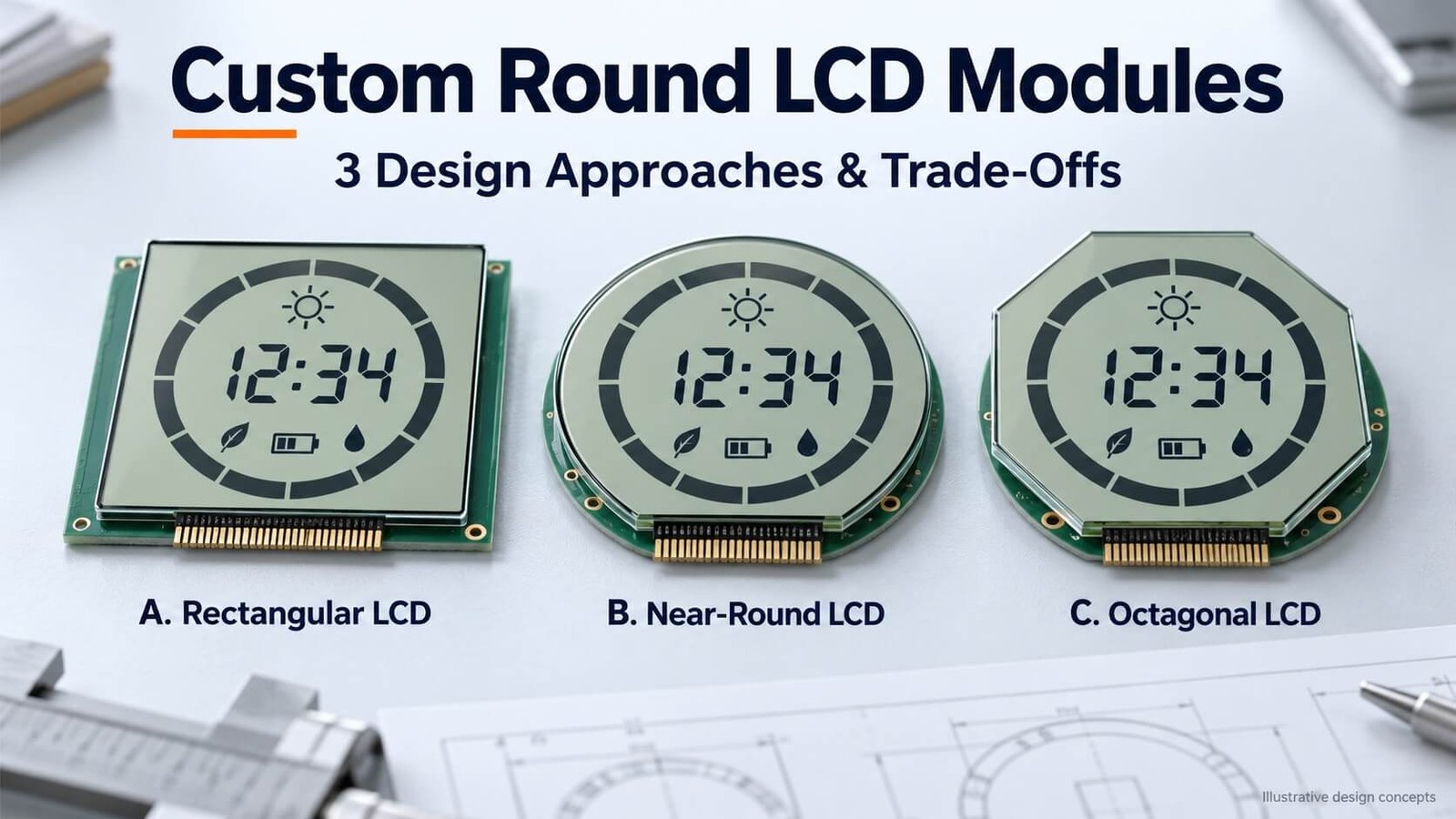
Three useful approaches are a rectangular LCD behind a round window, a near-round LCD with a flat connection edge, and a polygonal LCD behind a round window. The appropriate route depends on hidden space, electrode connections, backlight geometry, mounting and development cost.
In this DisplayMan case study, Greg compares the original monochrome segment designs and their drawings. The dimensions explain one project; they are not universal manufacturing limits. The goal is to choose a workable complete assembly before committing to tooling.
Start with the Round Window, Not Only the Glass Shape
A round-looking display does not require every internal component to be a complete circle. The LCD glass, visible window, backlight and PCB can have different outlines. The enclosure hides some regions while providing support and space for connections.
This case study concerns a custom monochrome segment LCD with circular graphic elements and numeric information. It is not a claim that all circular LCD products must use these constructions. Available circular TFT LCD modules provide another route for full-color pixel graphics.
In the original project, I compared three ways to package a similar display area. The main lesson is to design the optics, connections and mounting together rather than drawing a circle first and leaving the electrical connection until the end.
The Original Display Requirement and Dimensions
The artwork combined an outer ring of 60 elements, an inner ring of 30 elements and six seven-segment digits. The resulting base count was 60 + 30 + 6 × 7 = 132 independently driven elements. Confirm any decimal points, colons, units or extra icons separately; they would change the required map if independently controlled.
The project used a nominal 77 × 77 mm viewing-area envelope. This dimension describes the project drawing, not a universal active diameter or a promise that every point within that square remains visible through a round mask.
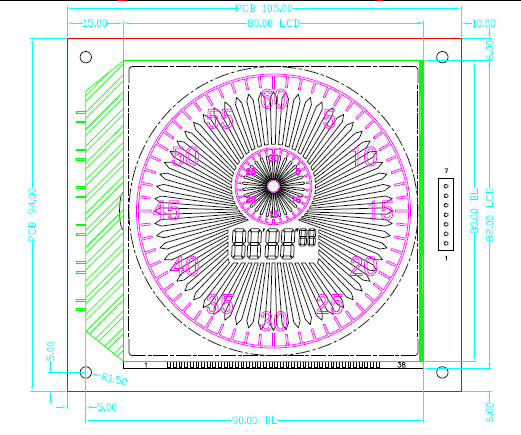
The original colored printing was decoration on the glass, not a full-color programmable pixel matrix. Changing fixed shapes or independent elements can require new glass artwork and a revised drive map.
For the broader distinction, see Segment LCD Displays and the segment-versus-dot-matrix section of the custom LCD guide.
Plan A: Rectangular LCD Behind a Round Window
This route keeps a relatively straightforward rectangular LCD/backlight assembly behind a circular opening in the front enclosure. The customer sees the round window, while the internal product provides space around it for the connections and mounting.
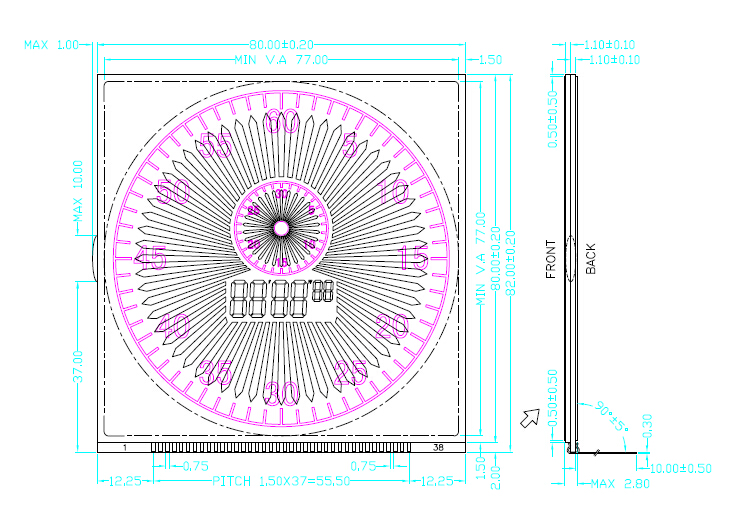
The original example used 80 × 82 mm LCD glass, a 77 × 77 mm viewing-area envelope, and an overall 94 × 105 mm COB module. The larger module outline included the backlight, PCB and mounting requirements; it was not simply unused display area.
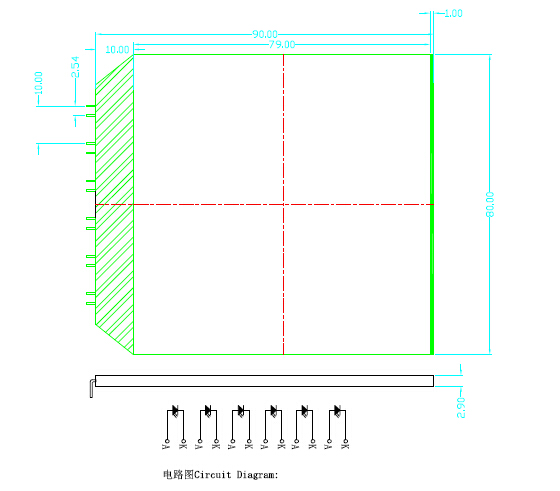
In that design, six DIP LEDs illuminated the backlight. The original light-entry/masking allowance was approximately 10 mm, with about 8 mm discussed as a lower design allowance for that arrangement. Those values belong to the chosen LED/backlight construction and should not be transferred to every modern backlight.
A backlight needs the intended illuminated aperture, LED entry region, optical films and mechanical support. Its overall outline is therefore not determined by the LCD viewing area alone. PCB mounting holes and their clearances also consume space; confirm actual hole diameters and geometry on the approved drawing.
When to evaluate Plan A: internal space is available and a relatively simple, supported assembly is more important than minimizing the hidden outline. It was the lowest-complexity starting point in the original comparison, but current pricing still depends on quantity and construction.
Plan B: Near-Round LCD with a Flat Connection Edge
The second route reduces the hidden envelope by shaping the assembly closer to the circular window while retaining a flat region for electrical contacts. In the original drawings, the PCB envelope was approximately 88 × 85.5 mm, and the LCD envelope approximately 86 × 83.5 mm.
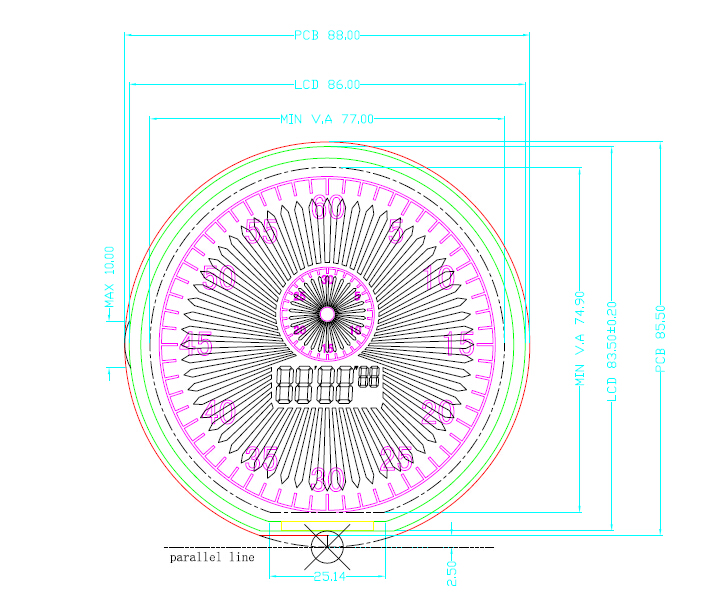
The original layout built outward from the 77 × 77 mm viewing envelope using allowances for the glass border, glass ledge and housing. The example discussed values such as 1.5 mm, 2.0 mm and 1.0 mm at different steps. These are case geometry, not universal minimum sealing, routing or structural limits.
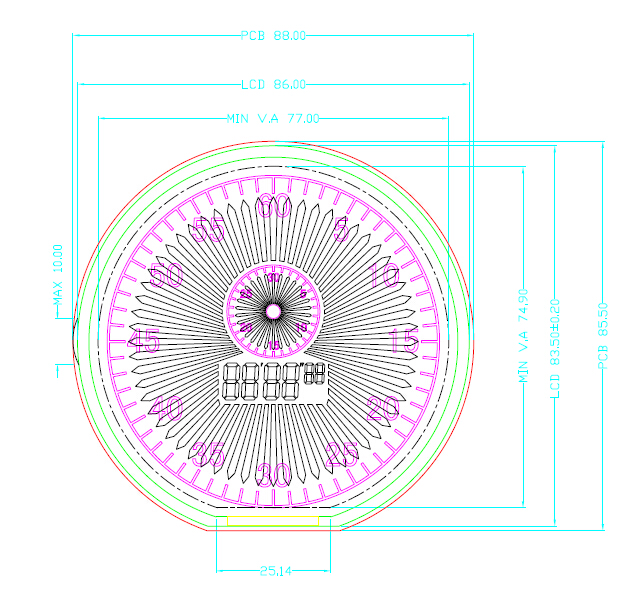
A flat connection edge of roughly 25 mm was available. This is why the segment count, multiplex drive and contact pitch became important. The plan should be specified as a newly designed glass outline and connection region—not as an instruction to trim an arbitrary finished LCD.
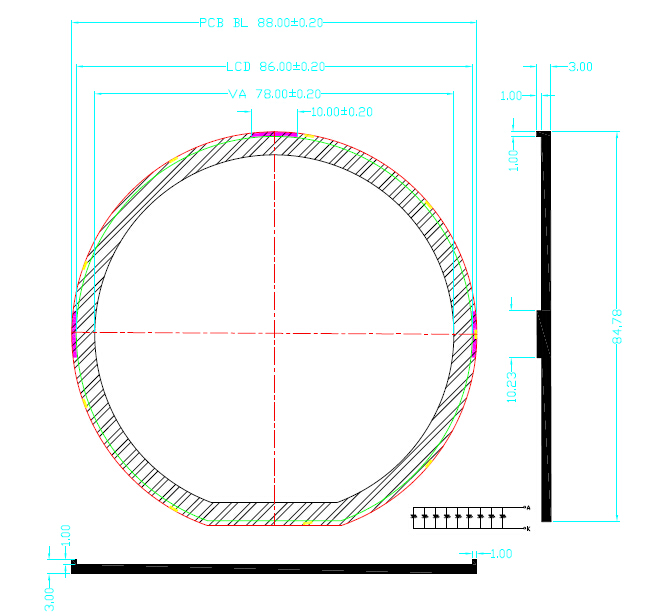
The backlight and PCB also needed retention in the enclosure. The original concept used housing compression and backlight features to locate components. Reliability depends on tolerances, contact load, support and validation; the outline alone does not establish that this design is stable or unstable.
When to evaluate Plan B: the external product needs a tighter round envelope, and the project can support custom glass, backlight and enclosure development. Confirm the viable contact ledge and assembly method before finalizing the visible artwork.
Can 132 Segments Fit the Available Connection Edge?
With 4 COM and an appropriate mapping, the 132 elements in this example can be addressed using 33 SEG lines + 4 COM lines = 37 electrode connections. This count assumes the artwork and driver support that mapping. It is not the host-interface pin count of a controller-equipped module.
At a uniform 1.27 mm pitch, the center-to-center span of 37 contacts is (37 − 1) × 1.27 = 45.72 mm, before accounting for contact width and end clearances. That exceeds the approximately 25 mm connection edge in this concept.
At a hypothetical 0.4 mm contact pitch, the same center span would be 14.4 mm, again before contact width and margins. The original “37 × pitch” figures were rough space allowances rather than an exact center-span calculation.
| Connection check | Required review |
|---|---|
| Electrode map | Independently controlled artwork, COM/SEG assignment and driver compatibility |
| Contact geometry | Center pitch, contact width, total span and end clearances |
| Conductive rubber strip | Conductive layer spacing, alignment, compression and PCB/glass pad overlap |
| Heat-seal or FPC | Bonding pitch, contact ledge, routing, attachment and termination |
| Module interface | Controller location, power and host connector requirements |
A fine-pitch elastomeric strip does not have the same geometry as discrete metal pins. Nor is a heat-seal interconnect automatically interchangeable with an FPC. The numerical example shows why the connection method matters; the supplier must confirm actual process capability.
Multiplexing saves connections but adds optical-drive constraints. Fewer COM lines can improve the design margin in a comparable segment project, while increasing electrode count and connection space. Review the trade-off rather than choosing 4 COM solely because it fits the drawing.
See the custom guide’s drive section and connection section.
Plan C: Polygonal LCD Behind a Round Window
The third route uses an octagonal—or another suitable polygonal—glass outline behind the circular enclosure. Straight edges provide another way to balance shape, connection space and mounting clearances.
The original method started from the visible polygon, allowed a glass border around it, and then established the surrounding PCB envelope. A hexagonal variant was also considered. A polygon behind a circular opening still needs a visibility check: corners, mask overlap and tolerances must not hide required segments.
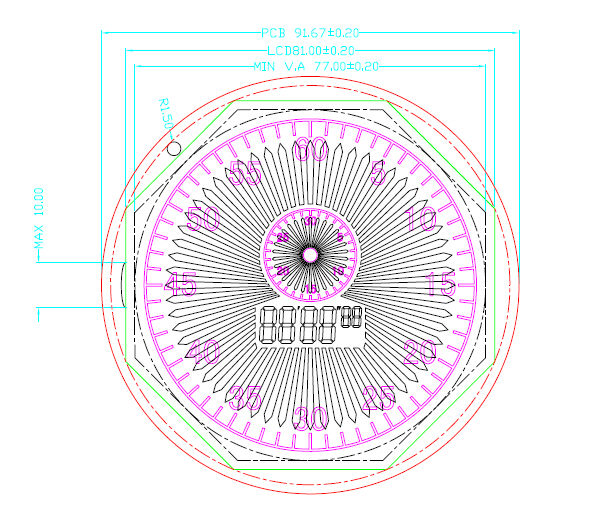
In the example, the glass envelope was approximately 81 × 81 mm, and the backlight envelope approximately 83 × 83 mm, with their useful illuminated/viewing regions aligned. The available outer PCB region provided mounting opportunities that were harder to accommodate in the tighter Plan B concept.
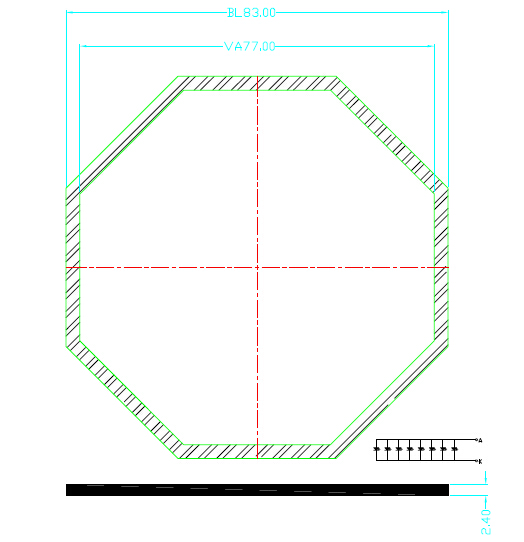
The enclosure still needed to retain and protect the display stack. PCB mounting points alone do not guarantee controlled glass support or conductive-strip pressure. Validate the complete stack and the assembly procedure.
When to evaluate Plan C: a round visible appearance is required, but a polygonal hidden outline offers a practical balance between custom geometry, connections and installation space. Its cost advantage over Plan B must be confirmed for the chosen process and quantity.
Comparing the Three Approaches
| Project factor | Plan A: rectangle behind round window | Plan B: near-round with connection flat | Plan C: polygon behind round window |
|---|---|---|---|
| Hidden envelope in this case | Largest | More compact | Intermediate direction |
| Glass/backlight development | Relatively simple starting point | More specialized outline and optical design | Polygon geometry and matched backlight |
| Connection space | More room to accommodate terminals | Flat contact edge can become a limiting factor | Straight edges provide layout opportunities |
| Mounting | More PCB area available for supports | Enclosure and contact retention need close coordination | Peripheral PCB space may support mounting |
| Visible round appearance | Produced by front window | Produced by window and shaped assembly | Produced by front window over polygonal stack |
| Cost tendency in original comparison | Lowest-complexity route | Higher custom-development burden | Compromise to evaluate |
| Reliability | Validate the actual assembly | Validate the actual assembly | Validate the actual assembly |
There is no universal winner. Compare the final installation envelope, tooling, unit price, contact reliability and service needs at the intended production quantity.
When a Standard Circular TFT LCD Is the Better Starting Point
If the interface needs full-color images, changing menus or rich pixel graphics, first review available Circular TFT LCD Displays. Selecting an existing module can avoid unnecessary custom monochrome-glass development.
A circular TFT still has a mechanical outline, routing and connector requirements that may extend beyond the circular active area. Check the full drawing, including FPC exit, bending clearance, touch/cover glass and support points.
The original case’s flat contact edge, pin count and monochrome tooling assumptions should not be applied as universal limits to all circular TFT products.
What to Send Before Requesting a Quote
Provide the visible-window diameter and enclosure drawing, available internal width/height/depth, complete artwork, and whether the requirement is fixed segments or a programmable pixel matrix.
Also state the driver/interface, available power, COM constraints if already fixed, viewing direction, positive/negative appearance, lighting/backlight requirements, operating range, quantity and schedule.
For backlight development, see Custom LED Backlight Quotation Requirements. For the full monochrome specification checklist, use Custom Monochrome LCD: 11 Requirements Before Quotation.
Approve a working sample in the intended enclosure. Check window masking, every segment, contrast, viewing angles, illumination, connection retention and mechanical tolerances before production.
Frequently Asked Questions
Does a circular window require a circular LCD glass outline?
No. A rectangular or polygonal assembly may sit behind a circular window if the enclosure has enough room and the required content remains visible.
Can I cut an existing LCD into a circle?
Do not assume that. Cutting a finished module or sealed cell can damage its seal, electrodes or electronics. This case study describes designed outlines and manufacturing review, not a general modification procedure.
Is the 25 mm connection flat a rule for round LCDs?
No. It belongs to the original case. Contact area follows the electrode map, process capability, artwork and mechanical geometry.
Which design is most reliable?
Reliability depends on the complete support, connection and manufacturing design. Compare qualified samples rather than assigning reliability from shape alone.
From guide to product
Explore Related Display Products
Choose the product direction that matches the visible content, hidden assembly and integration needs.
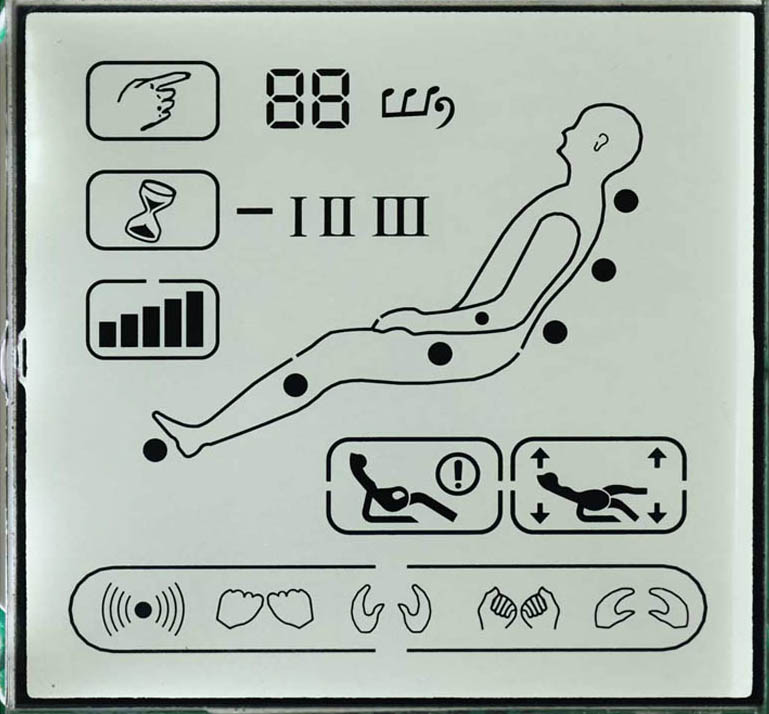
Segment LCD Displays
Review fixed digits and custom icons with the required drive, contact map and mechanical envelope.
Explore product options →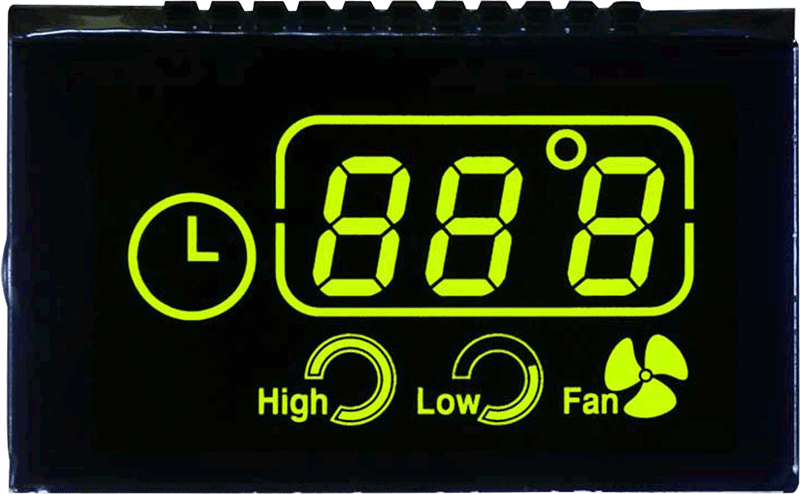
LCD Glass Panels
Discuss custom glass artwork, optical mode, connection ledge and the complete assembly requirements.
Explore product options →
Circular TFT LCD Displays
Evaluate existing full-color round modules before choosing a new custom panel development path.
Explore product options →Project review
Review Your Round LCD Module Requirements
Send the round window diameter, enclosure drawings, artwork, internal space, driver requirements and quantity. DisplayMan can review an existing module or a feasible custom assembly direction.
Prefer to open the enquiry form here?
Technical References and Further Reading
- DisplayMan: custom monochrome LCD requirements, drive and connection selection
- DisplayMan: custom backlight quotation requirements
- Orient Display: LCD connection structures
Project dimensions and drawings come from Greg’s original three-approach case study. Connection pitch, assembly allowances, optical performance and commercial terms must be confirmed for each new design.